
The Bronva Activity Feed
The activity feed is the heart of Bronva: a fast, friendly and wonderfully uncluttered place to share updates, photos, polls and ideas, react to what matters and keep up with the people you actually care about, wherever in the world they are. Here is how it works, what you can do and how you stay in control of everything you see.
- ⚡ Fast on any device
- 🧼 Clean and uncluttered
- 🗣️ Built for free expression
- 🎛️ You choose what you see
- 🌍 Made for a global community
- 🌙 Light and dark modes
- 🪪 16 and over
- 7ways to react
- 10photos per post
- 90days to schedule ahead
- 2–6poll options
What is the activity feed?
Think of it as your community’s front room. Members post short updates, photos, polls and life moments, and everyone can react, comment and share. It works the same way on phones, tablets and desktop computers, so it feels familiar from the first minute, just without the junk. Public posts can be seen by anyone, and you can limit individual posts to friends only whenever you want more privacy.
Live and up to date
New posts appear automatically when you are at the top of the feed, and older posts load smoothly as you scroll. When you have seen everything, a friendly “you’re all caught up” message lets you know. No endless guilt-trip scrolling.
Easy to find your way around
The post box sits at the top, posts are clearly laid out, and every action lives in a simple, familiar place. Nothing is tucked away behind menus inside menus.
Built for the whole world
Bronva can be used in many languages, times show in your own timezone, and right-to-left languages are supported. Posts in another language offer a Translate link so conversations can cross borders.
Important posts stay visible
Moderators can pin key community posts to the top of the main feed, so announcements are never lost in the scroll.
Notifications that make sense
Reactions, replies, tags, reposts and followed posts are gathered neatly, with several reactions grouped together and cleared the moment you open the post.
Badges that show who is who
Verified, Staff, Moderator, Founder, Supporter and Creator badges appear beside names, so you can see a member’s role at a glance.
Add it to your home screen
Install Bronva like an app on your phone or computer for one-tap access, with unread counts right on the tab or app icon.
Beautiful in light and dark
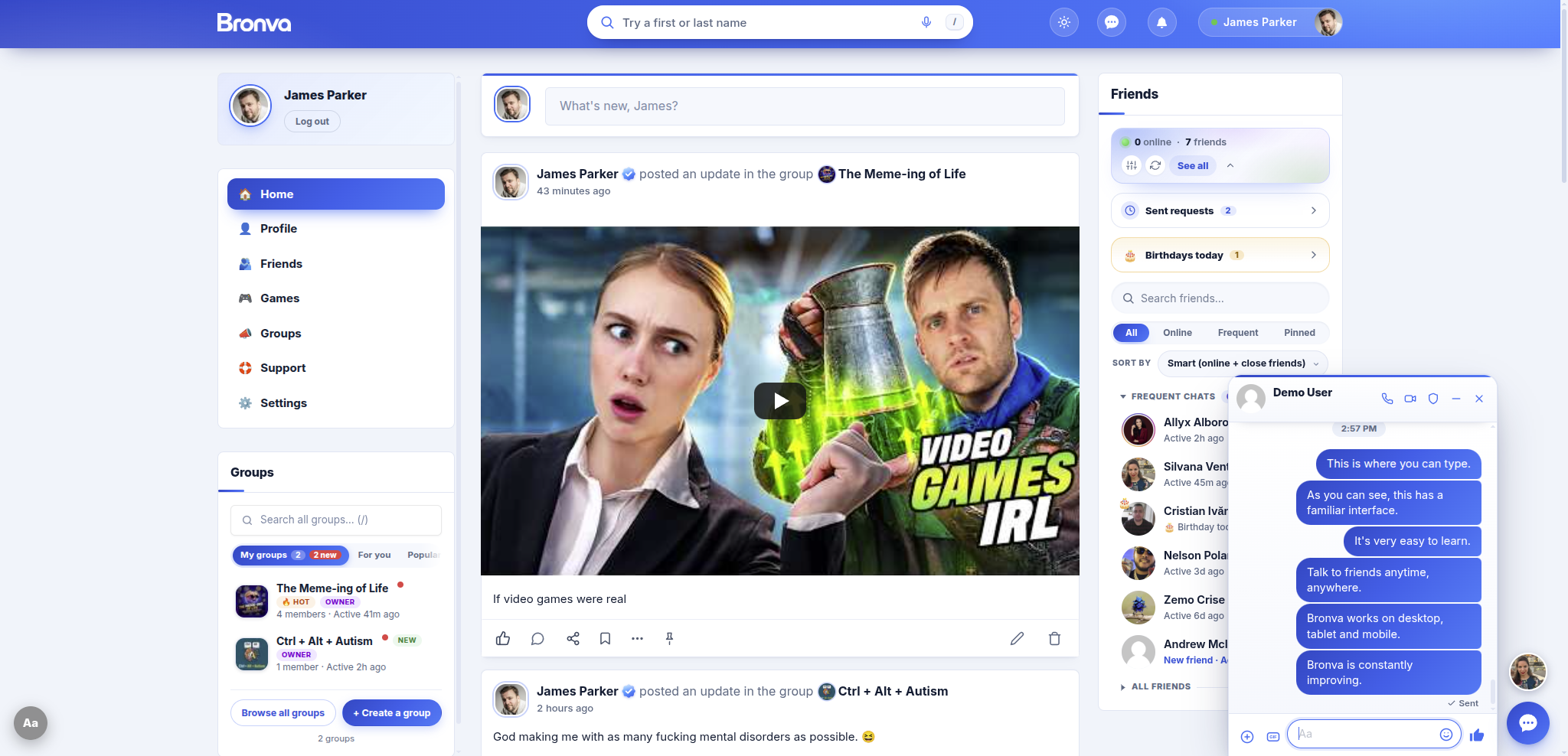
Here is the activity feed with Bronva Messenger alongside it, in both appearances. Choose light, dark or automatic in your display options.

Why Bronva’s feed is a better place to be
We built the feed around a simple idea: social networking should feel good, load quickly and respect you. Here are some of the reasons members love it.
🚀 Fast by design
Bronva is built with modern technology, so pages load quickly, photos are optimised and the feed stays smooth even on slower connections. A data-saver mode is there when you need it.
🧹 Clean and clutter-free
We only add features people genuinely need. You will not find pointless pop-ups, confusing menus or noise. The feed even hides routine “someone joined” and “someone changed their photo” items so real conversations take centre stage.
🗣️ Free expression, with fairness
Bronva is built to support freedom of speech and expression within the law and our Community Guidelines. Decisions are explained, and you can appeal if you think we got one wrong.
🎛️ You are in control
Mute words, mute or block members, hide single posts, hide link previews, switch to a compact or text-only feed and more. The feed adapts to you, not the other way around.
🔒 Privacy-minded
Hidden location and camera data is removed from your photos, uploaded files get random names, check-ins are deliberately approximate, and tracking codes are stripped from links you share.
♿ Welcoming to everyone
Adjustable text size, reduced motion, high contrast, dark mode, keyboard shortcuts and screen reader support help make the feed comfortable for as many people as possible.
🎉 Fun and useful
Polls, colourful text posts, life updates, feelings, GIFs, seven reactions and more make sharing expressive, while tools like drafts, scheduling and bookmarks make it practical.
🌱 Forever improving
Bronva is dedicated to constant improvement. New features arrive when the community needs them, and you can speak directly to the founder with your ideas.
🌍 Global by design
Use Bronva in many languages, see times in your own timezone, read right-to-left scripts comfortably, and find help lines for your own country or region in the Safety centre.
🤝 Real friends first
Bronva is built around people you actually know and want to know. Friends are suggested first when you tag, and friends-only posts keep personal moments personal.
🧘 Kinder to your headspace
A “you’re all caught up” message, optional break reminders, hideable counts and a feed that favours conversation over noise help Bronva feel good to use.
🔍 Find anything, fast
Press / to search people, groups and posts from anywhere, with smart name matching that copes with accents, nicknames and spelling slips.
💾 Your data, your call
Download your information, clear old posts automatically after a time you choose, or delete your account whenever you like.
Simple, on purpose
- No pointless pop-upsOnly the features people genuinely need.
- No settings buried in settingsEverything lives in a familiar place.
- Decisions explainedYou can appeal if you think we got one wrong.
- Always getting betterImprovements arrive all the time, shaped by you.
What you can do in the feed
Pick a tab to explore everything the feed can do. On a keyboard, use the arrow keys to move between tabs.
Your language
- Use Bronva in many languages, and each member chooses their own.
- Right-to-left scripts are detected automatically for every post.
- Posts in another language offer a Translate link. Choose your target language, or hide the link entirely.
Your time and place
- Times show in your own timezone, or switch to exact dates and times.
- Check-ins are deliberately approximate, wherever you are.
- The Safety centre shows help lines for your own country or region.
Easier reading
- Choose a system, extra readable, serif or monospace font.
- Adjust text size, line spacing and line length, and add a reading guide line.
- Use the Listen button to hear a post read aloud by your device.
Light on data
- Data saver loads images only as needed.
- Turn off autoplay and pause GIFs until you tap them.
- Large photos are shrunk on your device before upload, so sharing is quicker on slower connections.
Comfortable for everyone
- Dark mode, high contrast, reduced motion and underlined links.
- Larger tap targets, a bigger pointer and a strong keyboard focus outline.
- Full keyboard navigation and screen reader support.
Posts and formatting
- Write updates with bold, italic, strikethrough, code and blurred spoiler text.
- Add emoji from a searchable picker, or type shortcodes and classic text smileys.
- Short text-only posts (up to 200 characters) can have a colourful gradient background, with forty styles to choose from.
- A character counter appears as you near the limit.
Extras for your posts
- Tag up to ten people. Friends are suggested first, and tagged members are notified.
- Add a feeling or activity from a big searchable library.
- Check in to a place. Locations are deliberately approximate, so your exact doorstep is never shown.
- Share life updates such as a new job, a wedding, a move or a new pet.
Polls
- Ask a question with two to six answer options.
- Members vote with a tap, and can change or withdraw their vote.
- Live percentages and vote counts update as people respond.
GIFs
- Search and attach a GIF to a post or comment.
- GIFs are provided through a third-party GIF service, filtered to a teen-friendly (PG-13) content rating.
- No filter is perfect, so please report anything that slips through.
Plan ahead
- Schedule text posts to publish automatically up to 90 days ahead.
- View and cancel scheduled posts at any time.
- Unsent drafts are remembered in the post box and in comments, and you are warned before leaving with something unposted.
Handle with care
- Add a content warning so a post sits behind a click-to-reveal box.
- Mark a post as friends only, so just confirmed friends, you and moderators can see it.
- Hashtags become clickable searches, and links show helpful preview cards.
Sharing photos
- Add up to ten photos to a post, and photos to comments and replies too.
- Use the Photo button, paste from your clipboard, or drag and drop.
- Preview your photos, see upload progress and remove any before posting.
- Photos show in tidy grids, with a “+” overlay when there are more than five.
Smart, private photo handling
- Only genuine JPG, PNG, GIF and WebP images are accepted.
- Photos are turned the right way up and optimised for fast loading. Animated GIFs keep moving.
- Hidden location and camera data is removed, and original file names are never shown.
- Photos that you upload but never post are cleaned up automatically, and photos are removed when the post or account they belong to is deleted.
Viewing photos and videos
- Tap any photo for a full-screen viewer with next and previous, a counter, swipe and keyboard navigation.
- Zoom with pinch, scroll or double-tap, and drag to move around.
- Download button for photos, and a simple way to close with Escape, the Back button or a swipe down.
- Videos play with native controls, and embedded videos can go full screen on mobile.
Your Photos tab
- Every profile has a Photos tab with a grid of that member’s public photos.
- Owners can upload by button or drag and drop, and delete photos whenever they like.
To keep Bronva fast and safe, uploads have sensible size and usage limits, and we may remove images that break our rules. See Photo Sharing and Video Sharing for details.
Seven ways to react
Every post, comment and reply has a reaction control.
- 👍 Like
- ❤️ Love
- 🤗 Care
- 😂 Haha
- 😮 Wow
- 😢 Sad
- 😡 Angry
On a computer the picker opens on hover. On a touchscreen, press and hold. Tap the count to see who reacted and how.
Comments and replies
- Comments stay tucked away until you want them, keeping the feed tidy.
- Replies are neatly threaded on larger screens and flat on mobile, with the person’s name pre-filled.
- Long posts and comments are shortened with a simple “See more”.
- Everyone who comments automatically follows the post, so they hear about new replies.
Share and repost
- Copy a link, or share through popular messaging and social apps, email or your device’s share sheet.
- Repost with an optional comment. Reposts appear as quoted cards.
- Save posts to a private Saved tab so you can find them again.
Editing your posts
- Edit your own posts and comments in a clean inline editor.
- Posts can show an “edited” label, and a record of edits is kept to help keep discussions honest and safe.
- Delete your posts whenever you wish.
Notifications
- Hear about reactions, replies, tags, reposts and followed posts.
- Several reactions are grouped together so you are not overwhelmed.
- Notifications clear when you open the post, and you can choose what you receive.
On this day
An “On this day” card can resurface your own posts from earlier years, so you can look back on memories.
Shape what you see
- Mute members, mute chosen words and hide individual posts, with an option to restore them.
- Block members to hide each other’s content in both directions.
- Hide posts from very new accounts, if you prefer.
Display options
- Change text size, use a compact or text-only feed, and increase reading spacing.
- Hide link previews and Translate links, pause GIFs until tapped, and turn off autoplay.
- Choose dark, light or automatic appearance and exact dates and times.
Accessibility
- Keyboard navigation, a skip-to-feed link and screen reader support.
- Reduced motion, high contrast and underlined links.
- See Accessibility Features.
Handy shortcuts
- Press / or Ctrl / Cmd + K to search from anywhere.
- Move between posts with j and k.
- Press Ctrl or Cmd + Enter to post or reply.
- Use the in-app shortcut help window for the full list.
On every device
- Install Bronva on your home screen like an app.
- Unread counts can show in your browser tab, with optional sound and desktop alerts.
- A back-to-top button is always close by.
Stay connected your way
- Optional weekly email digests, only if you opt in.
- Quiet controls for notifications and emails in your settings.
Healthy scrolling, built in
Bronva is about real connection, friends, fun and useful things, not doom-scrolling. These optional tools help the feed fit around your life instead of taking it over.
Breaks and limits
Set break reminders, late-night reminders or a daily time limit. Your daily time counter stays on your own device.
Night tint and greyscale
Soften the screen in the evening with a night tint, or switch to greyscale for a calmer, less stimulating feed.
Hide the numbers
Hide counts, hold the feed back until you choose to open it with the feed shield, and add a gentle stop-scroll nudge.
Quiet on your terms
Pause notification emails, set quiet hours, or receive a daily or weekly summary instead of constant alerts.
Blurred until you tap
Choose to blur photos and videos until you tap them, and pause GIFs and autoplay so nothing surprises you.
Quick exit
Show a red Quick Exit button, or press Esc three times, to leave Bronva straight away for a neutral website.
Make your first post in five steps
- Create your accountJoin free in about a minute. You must be 16 or over, and your date of birth stays private.
- Open the feedHead to the activity feed and find the post box at the top.
- Write and add extrasType your update, then add a photo, GIF, poll, feeling or tag if you like.
- Choose and postDecide who can see it, then post, schedule it, or save it as a draft.
- Bring someone with youInvite a friend or family member. Bronva is better with people you know.
Safety and responsibility in the feed
A great feed is a safe feed. Bronva supports free expression, and we also take our responsibility to protect members seriously. We build our safety tools with the UK Online Safety Act in mind, and we work to meet the safety expectations of the countries our members live in.
Tools for you
- Report any post or comment from its menu, choosing a reason such as illegal content, child safety, self-harm, harassment, threats or hate, or spam and scams.
- Block and mute members, mute words and hide posts at any time. The same tools are built into Bronva Messenger.
- Content warnings and friends-only options help you share thoughtfully.
- Extra protection for under-18s: members aged 16 or 17 automatically receive our strongest privacy and safety settings.
- Posts you report may be hidden while our team reviews them. Reported content is reviewed by people, and you can appeal decisions you disagree with.
Learn more: Reporting Content · Reporting Illegal Content · Moderation Appeals · Safety Centre
Our shared ground rules
- Bronva is for people aged 16 and over.
- You are responsible for what you post. Please only share content you have the right to share and that follows the law and our Community Guidelines.
- Illegal content, content that exploits or endangers children, threats, harassment and scams are never allowed.
- We may remove content, restrict features or suspend accounts that break our rules, and we explain our decisions where we reasonably can.
- Please think before sharing personal details, such as addresses, phone numbers or card numbers, on a public post.
- Badges such as Verified, Staff, Moderator, Founder, Supporter and Creator show a member’s role or status and are not an endorsement of anything they post.
Take control in one tap
Strong privacy shouldn’t take hours. These shortcuts live in your privacy settings. See Changing Privacy Settings for a walkthrough.
Lock down
Set everything to its most private option with a single tap, then loosen only what you want to.
Privacy presets
Choose Open, Balanced, Private or Maximum privacy as a starting point, and undo your last save if you change your mind.
Pause your account
Step away for a week, a month, three months or until you switch back on, without losing anything.
Panic button
Hide your profile, pause your account, lock your privacy settings and sign out your other devices in one go.
Your content, your privacy
Anyone can see it, including people who are not logged in.
Visible only to people logged in to Bronva.
Just your confirmed friends, you and moderators.
Keep areas such as your friends list or photos to yourself.
Your profile, friends list, groups and photos can each use these levels in your privacy settings. Individual posts can be public or friends only.
- We process the information needed to run the feed safely and well, such as your posts, reactions and settings, as explained in our Privacy Policy.
- Public posts can be seen by anyone, may be shared or copied by others, and can appear in search engines or on other sites. Friends-only posts are visible only to your confirmed friends, you and moderators.
- When you delete a post, we remove it from Bronva. We cannot control copies that others have already saved, shared or captured elsewhere.
- You keep ownership of what you create. By posting, you give Bronva the permission needed to display and deliver it as part of the service, as set out in our Terms and Conditions. See also Copyright and Intellectual Property.
- You can manage your cookies at any time from Cookie Settings, and request your data from Personal Data Requests.
- You can ask search engines not to list your profile, and ask AI companies not to use your text or photos for training, from your privacy settings.
- You can have old posts deleted automatically after a time you choose, and download your information or delete your account whenever you like.
- Your data rights depend on where you live. Data Protection and Your Rights explains how they apply to members around the world.
Help us shape the feed

James William Steven Parker, Founder
The feed is built for you, and it is never finished. If there is something you wish it did, or something that feels off, tell us. We add features when the community needs them and never for the sake of clutter. Your ideas genuinely shape what comes next.
Activity feed questions
Who can see my posts?
Public posts can be seen by anyone, including people who are not logged in. If you choose friends only, just your confirmed friends, you and moderators can see the post. You can change your wider privacy settings at any time in your account.
Can I edit or delete a post?
Yes. You can edit your own posts and comments, and delete them whenever you like. Edited posts can show an “edited” label.
How many photos can I add to a post?
Up to ten per post, and you can add photos to comments and replies as well. We accept genuine JPG, PNG, GIF and WebP images, and we optimise them so they load quickly.
Is my location shown when I check in?
No exact location is shown. Check-ins are deliberately rounded to an approximate area, and you choose whether to add one at all.
How do I hide something I don’t want to see?
Use the menu on a post to hide it, mute the member, or report it. You can also mute chosen words and block members from your settings.
Can I schedule posts for later?
Yes. You can schedule text posts to publish automatically up to 90 days ahead and cancel them at any time from your scheduled list.
Why was my post hidden or removed?
Posts may be hidden or removed if they are reported or break our Community Guidelines or the law. You will be told why where we reasonably can, and you can appeal through Moderation Appeals.
Can anyone under 16 use Bronva?
No. Bronva is for people aged 16 and over. Members aged 16 or 17 automatically receive our strongest privacy and safety settings.
Does the feed work on my phone?
Yes. It is designed for phones, tablets and computers, and you can add Bronva to your home screen to use it like an app. See Installing Bronva as an App.
Is Bronva free to use?
Yes. Joining Bronva is free and takes about a minute.
Can I use Bronva outside the UK?
Yes. Bronva is built for a worldwide community, with many languages, times in your own timezone and help lines for your own country or region. You must be 16 or over and should only use Bronva where it is lawful for you to do so.
Can I read posts in other languages?
Yes. Posts in a language other than yours show a Translate link. You can choose your target language or hide the link in your display options. See Languages and Translation.
How do I take a break or limit my time?
Your settings include break reminders, a daily time limit, quiet hours, notification pauses and the option to pause your account for a while. Nothing is lost when you step away.
Can I hide when I was last active?
Yes. You can hide when you were last active and choose who sees your profile, friends list, groups and photos from your privacy settings.
Does Bronva have dark mode?
Yes. Choose light, dark or automatic, which follows your device, in your display options.
How do I stop GIFs and videos playing automatically?
Turn off autoplay and choose to pause GIFs until you tap them in your display options. You can also use data saver mode on slower connections.
How do I report a post?
Open the menu on the post and choose Report, then pick a reason. See Reporting Content, or Reporting Illegal Content for serious cases.
Be part of something new, and bring someone with you
Bronva is brand new, and a feed is only as good as the people in it. Every person who joins and invites a friend helps this community grow into something special. Invite your friends, family and loved ones, share your first post, and tell us what you would love to see next. We’ll build features as you need them.
Related help
🕒 Page last reviewed: November 2026
This page is a general guide to the Bronva activity feed. Features, limits and options may change as Bronva improves, and some features may not be available in every location or on every device or browser. Content posted by members is the responsibility of the member who posted it, and the views expressed by members are their own, not Bronva’s. Bronva works to keep its community safe but cannot guarantee that every piece of content will be reviewed or removed instantly. Nothing on this page limits any rights you have under applicable law in the country where you live. Bronva is open to people aged 16 and over, and if the law where you live sets a higher minimum age or other requirements for using online services, those requirements apply to you. Your use of Bronva is subject to our Terms and Conditions, Community Guidelines and Privacy Policy.