Live activity feed
Share updates, photos, GIFs, polls and life milestones, and keep up with the people you actually care about in a fast, tidy feed.
Bronva is a fast, clean and friendly social network where you can chat with the people you actually know, share what’s going on, join groups, make free voice and video calls and play free games. Everything is where you expect it, and the junk has been removed.
By joining, you agree to our Terms and Community Guidelines, and confirm you are 16 or over. See how we use your data in our Privacy Policy.
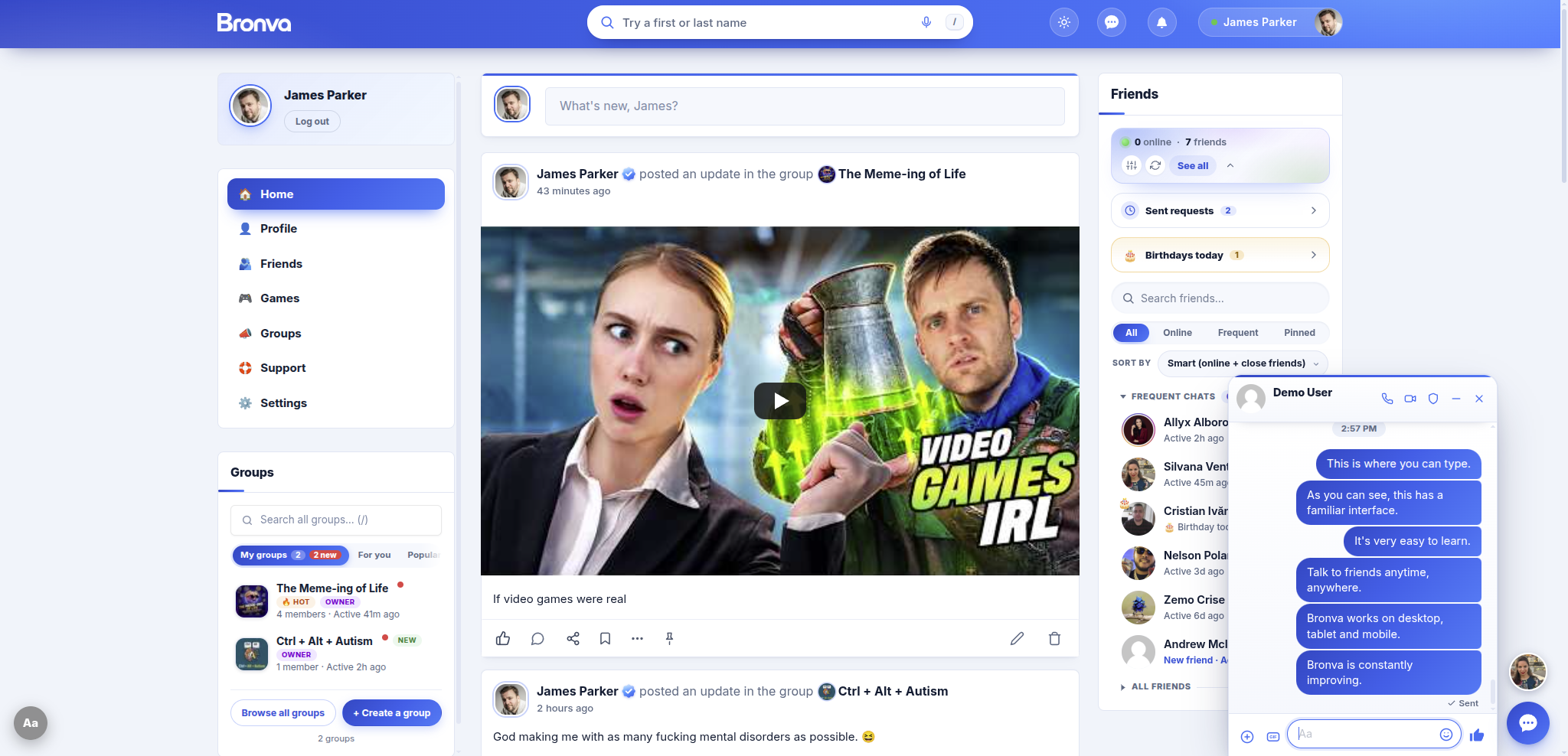

Social, Games, Groups and Support all share one clean look and one sign-in, so you always know where you are.
Bronva is a free social network for people aged 16 and over. It brings friends, family, groups, private messaging with voice and video calls, and free browser games together in one fast, clean place, with strong privacy controls and fair community rules that protect freedom of expression.
Familiar from the first minute, with plenty of power waiting when you want it. Every feature is here because members actually need it.
Share updates, photos, GIFs, polls and life milestones, and keep up with the people you actually care about in a fast, tidy feed.
Chat in a window that follows you around the site. Send photos, videos, voice messages, files, GIFs and emoji in real time.
Start a private voice or video call with any friend in one tap, straight from your chat. No extra app to install.
See who’s online, spot birthdays, get gentle suggestions for people you may know, and pin the friends you talk to most.
Create or join public, private or hidden groups with their own feeds, members and admins. Find your corner of the internet.
Bronva Games has 2,600 free browser games in 29 categories. Nothing to download and nothing to sign up for. Just press play.
Find people, groups and posts in seconds. Search understands nicknames, spelling slips and names in any order.
Like, Love, Care, Haha, Wow, Sad and Angry on every post and comment, so you can say exactly how you feel.
Share up to ten photos in one post and view them in a beautiful full-screen viewer. Hidden location data is stripped from your photos.
Choose who sees your profile, apply a privacy preset in one tap, hide your online status, or hit Lock down to go fully private.
Add Bronva to your home screen for quick access, instant loading and unread alerts on the app icon.
Use Bronva in your own language, see times in your own time zone and translate posts written in another language with one tap.
Never miss a birthday. Send a warm wish in a couple of taps and keep in touch with the people who matter most.
Bookmark posts into a private Saved tab so you can always find the good stuff again.
Write now and publish later. Unsent drafts are remembered so you never lose your words.
Change text size, spacing, contrast and motion, use a keyboard or screen reader, and switch on data saver.
Share your personal invite link in one tap and see how many friends have joined through it.
Block, mute or report from any post, profile or chat. Blocking is never announced, and muting is a quiet break.
Schedule quiet hours or snooze everything for an hour, so Bronva only buzzes when you want it to.
Follow your device’s light or dark setting and pick an accent colour for your profile tabs and settings.
See your posts from earlier years resurface and relive the moments that mattered.
Check in to places with a location rounded to roughly 100 metres, so your exact doorstep is never shown.
Ask a question with two to six options and watch live percentages come in.
Fix a typo in a post or comment, or unsend a message within fifteen minutes.
Choose what you hear about, pause emails, set quiet hours or get a daily or weekly summary.
Pin up to twenty friends so the people you talk to most are always at the top of your list.
Download your information or delete your account yourself, whenever you like.
Hashtags become clickable searches and shared links show a tidy preview, with tracking junk removed.
An emoji picker, GIF search and stickers in posts, comments and chat.
Type the right secret words in chat and watch the screen come alive. Discover them all and earn your rank. No spoilers here!
Pick a colour for each conversation so your chats are easy to tell apart at a glance.
Star the messages you want to keep and find them again in one private list.
Search inside a conversation with next and previous results, or across your past chats.
Save a whole conversation as a text file whenever you like.
Set an automatic reply for when you’re unavailable. Each person only gets it once every twelve hours.
Messages from people who aren’t your friends wait in their own place, with photos and videos blurred until you tap.
Move around, search, like, save and chat from your keyboard, with a handy help window.
A gentle reminder to say hi to a close friend you haven’t spoken to for a while.
Change fonts, spacing, line length, contrast and more, and turn on a reading guide line.
Quick look previews, saved groups, a Surprise me button and friend-based suggestions.
Choose a daily or weekly summary of what you missed, and pause emails whenever you like.
Posts written in another language show a Translate link, and times appear in your own time zone.
Messenger warns you about scams, risky links and unsafe requests before you act, and you always stay in control.
Record voice messages of up to three minutes or video messages of up to a minute, right in your chat.
Schedule a message to send up to thirty days ahead, and cancel it any time.
Mute up to fifty words or phrases so posts containing them quietly disappear from your feed.
A blue seal shows when an account has been verified by Bronva.
Save your own quick replies and use slash commands like /shrug, /time and /dice in chat.
Break reminders, late-night nudges, a daily time limit and a greyscale mode help you stay in control.
Have posts read aloud using your device’s own voice, or translate them with a tap.
One tap, or pressing Esc three times, leaves the site instantly for somewhere neutral if you need privacy.
Gentle friend suggestions with a clear reason for each one, and a one-tap way to dismiss them.
Back up and restore your settings, or apply a privacy preset in one tap.
Tap the microphone in search and say a name, where your browser supports it.
Pick up where you left off with recent searches, and pin up to five you use all the time.
A simple meter shows how many protections are on and lists any that are not.
Take a break for a week, a month, three months or until you switch it back on.
Have old posts delete themselves after thirty days, three months, six months or a year.
Choose to hide posts from accounts that are less than seven days old.
Download your posts, friends list, consent record and sign-in history whenever you like.
Get an email when your account is signed in from a device you haven’t used before.
See when a friendship started and get a nudge when an anniversary is coming up.
Forward a message to someone else or copy its text from the message menu.
Pin your favourite chats to the top, or archive them until something new arrives.
Reaction alerts are grouped together, and you can clear them all with one link.
Press Ctrl or Cmd + K to jump anywhere on Bronva in a couple of keystrokes.
Pick blue, purple, green, orange, pink, teal or red and make your profile feel like yours.
Link previews are fetched by Bronva itself, so the linked site never sees your address.
Clear every unread badge and message notification in one tap, after a quick confirmation.
Preview a group’s full description and join from a pop-up, without leaving the directory.
Tag up to ten people in a post, with friends suggested first. Tagged members are notified, and you choose who can tag you.
Give short text posts one of forty gradient backgrounds and make a quick thought stand out.
Add how you’re feeling or what you’re up to from a big, searchable library of emoji-labelled moods.
Hide a post behind a click-to-reveal box, or blur a spoiler until someone chooses to see it.
Share something with confirmed friends only, with one tap before you post.
Repost with your own comment, or share a post by link, WhatsApp, Telegram, email and more.
Get notified about new comments on posts you care about, and unfollow in a tap.
Pinch, scroll or double-tap to zoom, swipe between photos and download the ones you love.
Keep a private note about a friend that only you can ever see.
Open, Balanced, Private or Maximum privacy in one tap, then fine-tune anything you like.
Hide your online status, last-active time, read receipts and typing dots whenever you like.
Calm your screen at night with a warm tint, or switch to greyscale to make scrolling less tempting.
File friends under Family, Close friends, Work or School and filter your list with a tap.
No complicated set-up and no maze of options. Four simple steps and you’re in.
Choose a username, add your email and a strong password, and confirm you’re 16 or over. Your date of birth is only used to check your age and is never shown to other members.
Click the link we email you and you’ll be signed in and taken straight to your activity feed. No phone number needed.
Search for friends, join groups that match your interests and invite family. Set your privacy exactly how you like it, or pick a one-tap preset.
Post updates and photos, send private messages, make free voice and video calls, and take a break with free games whenever you like.
This is a demo post. React in seven ways, vote in the poll and see how a Bronva post feels. Then join and do it with real friends.
Quick question for the community: tea, coffee or something else? ☕
Tap a reaction to try it.
Light or dark, phone or desktop. Take a look inside Bronva.
Catch up with friends in a fast, tidy feed and keep chatting without leaving the page. The messenger window follows you wherever you go.
Bronva follows your device’s light or dark setting automatically, and you can adjust text size, spacing, contrast and motion to suit you.
Browse a beautiful directory of communities built around shared interests. Join public groups instantly, ask to join private ones, or start your own.

Each group has its own cover image, photo, member list and activity feed, plus simple tools for the people who run it.

Bronva Games is a library of 2,600 free browser games that start instantly. Search, browse by category or tag, or let Surprise me pick one. Nothing to download and no account needed to play.

A clear, searchable settings area puts privacy, security, messaging and comfort in your hands, with one-tap presets when you want to keep it simple.

The Support centre has step-by-step guides, safety information, policies and a friendly way to contact us or suggest a feature.

Everything here exists because members need it, and everything else has been left out on purpose.
Bronva is built around people, not noise. Here’s what makes it different, and why it keeps getting better.
Disagreement, criticism and unpopular views are not a reason for removal. Clear rules protect people from genuine harm, not from opinions.
Reports are reviewed, decisions are explained, and there is a published complaints procedure and appeals process if something goes wrong.
No maze of menus and options hidden inside more options. Everything is where you expect it, and the junk has been removed.
Built with modern technology to be quick, light and reliable, with data-saver and reduced-motion modes for slower connections.
Bronva focuses on the people you actually know and want to know, plus games, news and tools, rather than endless noise you never asked for.
Download your information, delete your account, apply privacy presets and choose your cookie settings. Rejecting is exactly as easy as accepting.
Block, mute and report from anywhere. Messenger warns you about scams and risky links, and members aged 16 to 17 get the strongest protections automatically.
Feels like what you already know: a feed, friends, groups and chat. It’s just calmer, cleaner and easier on the eyes.
Features are added when people genuinely need them. You can talk to the founder directly and ask for improvements.
Choose your own language, see times in your own time zone, translate posts with one tap and find help lines for your own country. Bronva is open to everyone aged 16 and over, wherever they live.
Plain-English settings, one-tap presets and a Lock down button mean you never need a manual to protect yourself.
Joining is free, using Bronva is free, and you never need payment details to get started.
Bronva tells you plainly what it can and can’t do, and asks for your consent before anything optional runs.
Break reminders, a daily time limit, quiet hours and a greyscale mode help you stay in control instead of keeping you scrolling.
Public display names are first and last names with the @username underneath, which helps friends find each other and keeps names consistent.
Constant visual, speed, security and usability improvements mean Bronva keeps getting better.
Bronva Games is a free hub of 2,600 browser games in 29 categories, from puzzles and arcade classics to racing, word games and much more. Nothing to download and no sign-up needed to play.
What should I play?
Popular tags
Bronva is built for a worldwide audience. Choose your own language, translate posts written in another language, and use Bronva Messenger in your language too.
Bronva shows times in each member’s own time zone. Here is what time it is around the world right now.
Choose your own language and translate posts written in another with one tap.
Times are shown in each member’s own time zone, wherever they are.
Text direction follows each post’s language, so Arabic, Hebrew and Persian read naturally.
Typography is tuned for non-Latin scripts so every language looks right.
The Safety Centre shows emergency numbers and help lines for your own country.
Data-saver and reduced-motion modes keep Bronva fast on any connection.
No app store and no big download. Install Bronva in a few taps for quick access and unread alerts on the icon.
Open Bronva in Safari, tap the Share button, then choose Add to Home Screen.
Open Bronva in Chrome, Samsung Internet or Firefox, tap the menu, then choose Install app or Add to Home screen.
In Chrome or Edge, click the install icon in the address bar to open Bronva in its own window.
Free expression doesn’t mean anything goes. Bronva keeps clear rules against threats, harassment, exploitation and illegal material. It is run from the UK and designed with the UK Online Safety Act in mind, and the same protections apply to members everywhere in the world.

Hi, I’m James. I created Bronva because I wanted a social network that is fast, simple and easy on the eyes, where people can speak freely and where there is always a fair way to put things right.
Bronva grows with the people who use it. If there’s something you need, tell me. Features are added when people genuinely need them, never to add clutter.
James William Steven ParkerFounder of Bronva
Friendly, step-by-step help for every feature.
Quick answers about joining, privacy, safety and features.
Bronva is a free social network for people aged 16 and over. It brings friends, family, groups, private messaging with voice and video calls, and free browser games together in one fast, clean place, with strong privacy controls and fair community rules that protect freedom of expression.
Yes. Bronva is free to join and free to use. Creating an account takes about a minute and you don’t need any payment details.
Bronva is for people aged 16 and over. Members aged 16 or 17 automatically receive the strongest privacy and safety settings, and your date of birth is only ever used to check your age. It is never shown to other members.
Bronva was built to support freedom of speech and expression. Disagreement, criticism and unpopular opinions are not automatically removed. Threats, harassment, exploitation and illegal material are not allowed, and the rules are written in plain English in our Community Guidelines.
Bronva keeps things clean, fast and simple. There is no maze of menus and settings hidden inside more settings, features are added when members genuinely need them, and the focus is on the people you actually know, plus games and useful tools, rather than noise you never asked for.
You control who can see your profile, friends, groups and photos. You can apply a privacy preset, use the one-tap Lock down button, hide your online status, block or mute anyone, and review the devices signed in to your account.
Yes. Bronva Messenger gives you private conversations with photos, videos, voice messages, GIFs, reactions and replies, plus free voice and video calls between friends, all from a chat window that stays with you as you browse.
No. Bronva works in your web browser on phones, tablets and desktop computers, with light and dark modes. If you like, you can add it to your home screen and use it like an app.
Yes. Bronva Games has 2,600 free browser games in 29 categories, including puzzle, quick-play, action, arcade, racing, word and card games. There is nothing to download and no sign-up needed to play.
Search by name or topic, browse by category or tag, sort by latest, most played, A to Z or hidden gems, or press Surprise me for a random pick. The Games home page also features a Game of the day.
Bronva Games brings together free browser games from many independent developers and game publishers. They run in your browser, and if you spot anything unsuitable you can report it through our Support centre.
Visit the Support centre, where you can search every guide, browse topics such as getting started, Messenger, privacy and safety, or email support@bronva.com.
Choose “Forgot your password?” on the log in page and Bronva will email you a reset link so you can choose a new one. Our Resetting Your Password guide walks you through every step.
Your public display name is your first and last name, with your @username shown beneath it on your profile. This helps people recognise real friends and keeps names consistent across the community.
Yes. After you sign up, Bronva emails you an activation link. Clicking it activates your account and signs you straight in.
Yes. In your privacy settings you can ask search engines not to list your profile, hide yourself from the Members directory and choose who can see your profile, friends, groups and photos.
Yes. Your privacy settings let you ask AI companies not to use your text or photos for training, and ask search engines not to keep cached copies. These are requests sent to third parties, so they depend on those companies respecting them.
Yes. You can pause your account for a week, a month, three months or until you switch it back on, and you can pause notification emails too.
You can edit your own posts and comments, and you can edit your text messages and unsend messages within fifteen minutes of sending them.
Yes. You can schedule text posts to publish automatically up to 90 days ahead, view your scheduled posts and cancel them. Unsent drafts are remembered for you too.
Nothing optional runs before you choose. Rejecting is exactly as easy as accepting, choices are granular, and you can change your mind at any time from Cookie settings. Strictly necessary cookies, such as the ones that keep you signed in, are always on.
Bronva was founded on 25 October 2026 by James William Steven Parker, a British technology entrepreneur, and is independently run. You can meet the founder on our Support pages and speak to him directly with your ideas.
Email support@bronva.com or use the Contact page in our Support centre. If anyone is in immediate danger, contact your local emergency services first.
Bronva is for people aged 16 and over, so you can’t create an account yet. If a date of birth under 16 is entered at sign-up, the account isn’t created and the date isn’t kept.
Yes, from any post, profile or chat. Blocking hides each of you from the other and stops messages, friend requests and comments, and it’s never announced. Muting is a quiet break that silences someone’s posts and alerts without telling them.
Yes. Members can choose their own language, Bronva Messenger is available in many languages, and posts written in another language can be translated with one tap.
You can appeal. Bronva has a published complaints procedure and moderation appeals process, and moderation decisions are explained to you so there is always a fair way to put things right.
Yes. You can download your information and delete your account yourself from your settings whenever you like.
Yes. Bronva is open to people aged 16 and over around the world and works in any modern web browser. Members can choose their own language, and times are shown in each member’s own time zone. Where the law in your country sets a higher minimum age, that higher age applies.
No. Signing up asks for a username, an email address, a password, your name and your date of birth. You don’t need a phone number to join.
Bronva’s Safety Centre shows emergency numbers and help lines for your own country or region, with a country chooser. In an emergency, always contact your local emergency services first.
Yes. Bronva is built to be fast and light, and it has a data-saver mode and reduced-motion options so it stays comfortable on slower connections and modest devices.
Yes. Bronva supports keyboard navigation and screen readers, and lets you change text size, spacing, contrast and motion to suit you. Read more on our Accessibility pages.
Every post, profile and chat has a Report option, and you can also block or mute people from anywhere. Our Reporting Illegal Content page explains exactly what happens next.
Share your personal invite link by WhatsApp, Telegram, email, text message and more. People who join through your link are counted, so you can see how many friends you have brought along.
Yes. You can hide your online status and your last-active time, switch off read receipts and typing indicators, and choose who can message you.
Please do. Bronva adds features as members need them, and you can speak to the founder directly with your ideas and requests.
Yes. You can search inside a single chat with next and previous results, and search the text of your own past conversations from the chat list.
Yes. You can export a whole conversation as a text file from the chat menu.
Yes. Pick a colour for each conversation, mute sounds for one chat, pin chats to the top or archive them until something new arrives.
Yes. From your privacy settings you can permanently delete all of your posts and comments after confirming your password. You can also have old posts delete themselves after thirty days, three months, six months or a year.
That is up to you. You can choose to have an unused account deleted automatically after one, two or three years, and you are sent a warning email first.
Yes. Comfort settings let you show exact dates and times in your own time zone.
Your friends panel shows a green dot for friends who are online and an amber dot for friends who have been away for a little while. You can hide your own online status at any time.
Yes. Messages from people who are not your friends appear under “Message requests”, their photos and videos are blurred until you tap them, and you can choose to receive messages only from friends.
Yes. A Listen button reads posts aloud using your device’s own voice, and a Translate button helps with posts written in other languages.
Yes. Turn on Quick exit in your comfort settings to show a red button. You can also press Esc three times to leave straight away for a neutral website.
A blue seal with a white tick means Bronva has marked that account as verified. The seal is labelled “Verified Bronva account”.
Yes. You can mute up to fifty words or phrases, and posts containing them are removed from your feeds. You can also mute or block individual members and hide single posts.
Yes. Bronva Messenger checks incoming messages for warning signs such as requests for money, risky links and pressure to move the conversation elsewhere, and shows a clear warning you can dismiss. You choose how sensitive the warnings are, and nothing is silently blocked.
Yes. Record voice messages of up to three minutes or video messages of up to a minute right inside a chat, or send photos, videos, files and GIFs.
Yes. Schedule a message up to thirty days ahead, see everything that is waiting to send and cancel it whenever you like.
GIF search is set to a PG-13 rating, which means content suitable for teens.
Bronva is independently run from England and is designed with the UK Online Safety Act and UK GDPR in mind. The same protections apply to members everywhere, and your settings include summaries of data rights for many regions, including the EU, the US, Canada, Brazil, Australia and more.
Yes. From Messenger you can send a friendly email invitation to up to three people at a time, or share your personal invite link by WhatsApp, Telegram, text message and more. Invitations only go to people who are not already members, and each one includes a one-click opt-out.
Lock down is a one-tap button in your privacy settings that sets everything to its most private option. You can then loosen any setting you choose, one at a time.
Yes. You can download your posts, friends list, consent record and sign-in history as spreadsheets, or email yourself a one-time link to everything Bronva holds about you.
Yes. You can pause all notification emails for a day, a week, two weeks, a month or until you switch them back on, choose a daily or weekly summary instead, and set quiet hours.
Yes. In your privacy settings you can hide posts from accounts that are less than seven days old.
Friend lists let you file friends under Family, Close friends, Work, School or Neighbours and filter your friends with a tap.
Search finds people, groups and posts from anywhere on Bronva. It understands names in any order, nicknames such as Jim and James, and small spelling slips, and it respects every privacy setting, including “Hide me from search”.
Yes. Birthdays in the next two weeks are listed for you, and each member’s own date-of-birth privacy setting is respected.
Choose Poll in the post box, write your question and add two to six options. Members vote with a tap, can change or withdraw their vote, and see live percentages.
Yes. You can attach photos to your posts and to any comment or reply, by choosing them, pasting an image or dragging and dropping.
Yes. Mute sounds for a single chat, pin chats to the top or archive them until something new arrives, and give each conversation its own colour.
You choose. “Keep me logged in” is ticked by default, and in your security settings you can limit sessions to one, seven or fourteen days and turn on automatic sign-out after a period of inactivity.
Yes. Pick blue, purple, green, orange, pink, teal or red, and your profile tabs and settings follow it.
Yes. Bronva has shortcuts for moving between posts, liking, saving, searching and chatting, with a help window that lists them all.
Yes. Comfort settings change text size, spacing, contrast, fonts and motion, and add options such as a reading guide line and larger tap targets.
Yes. Schedule quiet hours or snooze everything for an hour, so Bronva only buzzes when you want it to.
Yes. Type an @username into search, or paste a profile link, and Bronva takes you straight to that member.
Yes. Break reminders, late-night reminders, a daily time limit, a night tint and a greyscale mode are all built in, so you stay in control.
Yes. Bronva follows your device’s light or dark setting automatically, or you can choose light, dark or automatic yourself and pick an accent colour for your profile.
Yes. You can tag up to ten people in a post, with friends suggested first. Tagged members are notified, and you choose who is allowed to tag you.
Yes. Tap the reaction count on any post to see exactly who reacted and with which of the seven reactions.
Yes. Add a content warning to hide a post behind a click-to-reveal box, or blur a spoiler until someone chooses to see it.
No. If you check in to a place, the location is rounded to roughly 100 metres so your exact doorstep is never shown, and hidden location data is stripped from the photos you upload.
Yes. People who comment on a post follow it automatically, and you can follow or unfollow any post from its More menu.
Bronva works in any modern web browser on phones, tablets and computers, including current versions of Chrome, Edge, Safari, Firefox and Samsung Internet. A few extras, such as voice search or install prompts, depend on what your browser supports.
Yes. Text direction follows each post’s language, so Arabic, Hebrew and Persian read naturally, and the typography is tuned for many non-Latin scripts.
Each member sees times in their own time zone, and you can choose to show exact dates and times instead of “2 hours ago” in your comfort settings.
Yes. Use the Report a problem page in the Support centre, or email support@bronva.com.
Yes. Sign in on as many devices as you like, see every device that is signed in from your settings, and sign out of all the others in one tap.
No matching questions. Try different words, or visit the Support centre.
If you want a calmer, cleaner place to connect with the people you actually know, you’re in the right place.
Stay close with private chats, photos, birthday reminders and free voice and video calls.
Play free browser games in seconds, with nothing to download and no sign-up needed.
Start a public, private or hidden group, invite people in a couple of taps and manage members and roles.
Apply a privacy preset, hit Lock down, hide your online status and keep your date of birth to yourself.
Use Bronva in your own language, see times in your own time zone and translate posts with one tap.
Quiet hours, snooze, break reminders and a clean feed let Bronva fit around your life, not the other way round.
Share your photos, projects and passions, and find groups full of people who love the same things.
Start a group for your street, town or club and keep everyone in the loop.
Disagreement is welcome here. Clear rules protect people from genuine harm, not from opinions.
Plain-English settings, one-tap presets and real choices. You never need a manual to protect yourself.
One tap sets everything to its most private option.
Choose Open, Balanced, Private or Maximum privacy, then fine-tune any setting.
Take a break for a week, a month, three months or until you switch it back on.
Hide yourself from the Members directory and ask search engines not to list your profile.
Ask AI companies not to train on your text or photos. These are requests to third parties, so they depend on those companies respecting them.
Have old posts delete themselves after thirty days, three months, six months or a year.
See every device signed in, sign out of the rest, and set automatic sign-out after a period of inactivity.
Nothing optional runs before you choose, and rejecting is exactly as easy as accepting.
Choose who can see your profile, friends list, groups and photos, then switch viewer to see what each person would see. It is a demo, so nothing is saved.
Looking as
Free expression doesn’t mean anything goes. Disagreement is welcome. Harm is not.
Bronva is for people aged 16 and over. Here is exactly how that works.
A chat window that follows you around the site, with everything you’d expect and a few things you wouldn’t.
Every group has its own cover image, feed, members and admins. Pick the level of openness that suits yours.
Open for anyone to see and join instantly. Ideal for hobbies, fan clubs and big communities.
Visible in the directory, but people ask to join and an admin approves them.
Not listed in searches or the directory. Only invited people can find and join.
Good habits protect you on every website and app. Bronva Messenger also warns you about risky messages.
Be very wary of requests for money, gift cards or crypto from someone you haven’t met in person.
Unexpected links, shortened links and links that look almost right deserve a second look.
Scammers rush you. If someone insists you act right now, slow down.
Be careful if a new contact quickly asks to move to a different app or website.
Never share your password with anyone, including people claiming to be from Bronva.
Use Report and Block from any chat or profile. Blocking is never announced.
Five sample messages. Tap what you think. These habits protect you on any app or website.
Not another place that demands your attention. Bronva is there when you want it and quiet when you don’t.
See which friends have birthdays and relive your posts from earlier years with On this day.
Play a free game that starts instantly, with nothing to download.
Catch up with your groups, share photos and join the conversation.
Chat with friends, then switch on quiet hours or snooze everything when you’re done.
Whether your people are across the road or across the world, Bronva helps you stay close to the people and things you care about.
Chat privately, send voice messages and make free voice and video calls with friends and family wherever they live. Times show in each person’s own time zone.
Join groups built around shared interests, or start your own with its own feed, members and admins.
Post photos, life updates and milestones, and let friends react in seven ways.
Play free browser games that start instantly, with nothing to download.
Choose who sees your profile, friends, groups and photos, or use a one-tap privacy preset.
See birthdays coming up and send a warm wish in a couple of taps.
Run a quick poll with two to six options and watch live percentages come in.
Reply with GIFs, stickers, emoji and seven kinds of reaction.
Resurface old posts with On this day, save favourites to a private tab and keep your photos in one place.
A friendly checklist appears when you join, so you always know what to do next.
A photo helps friends recognise you. Until you add one, Bronva shows a coloured circle with your initial.
Share as much or as little as you like, and choose who can see each detail.
Write your first post, or introduce yourself in a group.
Search by name, nickname or @username, and join groups that match your interests.
Pick a privacy preset, or fine-tune who can see your profile, friends, groups and photos.
Share your personal invite link and see how many friends join.
Bronva is independently run and built around its members. Here is what we aim to deliver, in plain English.
Bronva improves all the time, with changes to speed, security, design and ease of use. Tell us what you’d like to see next.
Our Support centre has step-by-step guides, safety information and a simple way to get in touch.
Choose a language to open a translated copy of this page. Translation is provided by Google Translate, a third-party service with its own terms and privacy policy, and machine translations may not be perfectly accurate.
Join in about a minute, then invite a friend, then another. Every new member makes Bronva better for everyone. Be part of something new.
We use essential cookies to keep Bronva secure and working. With your permission, we’d also like to use analytics cookies to understand how the site is used and improve it. Rejecting is as easy as accepting, and you can change your mind at any time. Read our Privacy Policy.
Choose which optional cookies you’re happy for us to use. Your choices are remembered for about 6 months, and you can change them at any time from “Cookie settings”. Questions? Email support@bronva.com.