
How can we help?
Quick answers and friendly step-by-step guides for everything on Bronva, from creating your account to keeping your privacy exactly how you like it. You must be 16 or over to use Bronva.
Tip: press / to jump straight to search.
Last updated: · Guides are improved all the time as Bronva grows.
In danger right now? Contact emergency services first.
Bronva is not an emergency service and we can’t send help to you. If someone is at immediate risk, call your local emergency number straight away.
- United Kingdom: 999 (or 101 for non-emergencies)
- United States and Canada: 911
- European Union: 112
- Australia: 000 · New Zealand: 111
- Elsewhere: search for “emergency number” plus your country, or visit findahelpline.com for free, confidential support lines worldwide.
Feeling low or worried about someone? Our Safety Centre lists support lines for your country. In the UK you can call Samaritans on 116 123 at any time.
Tip of the moment
- Press / almost anywhere to jump straight to search.
- Feeling overwhelmed? “Lock down” makes your account as private as possible in one tap.
- Schedule a text post up to 90 days ahead, then forget about it.
- Typo in a chat? You can edit or unsend your message within 15 minutes.
- Tap the heart on any game to save it to your favourites.
- Set quiet hours so notifications never wake you up.
Everything Bronva offers
A clean, fast social network with the things people actually use. Tap a card to learn more.
See Bronva in action
A peek at what’s waiting for you. Tap a picture to enlarge it, then tap outside it (or the ×) to close.
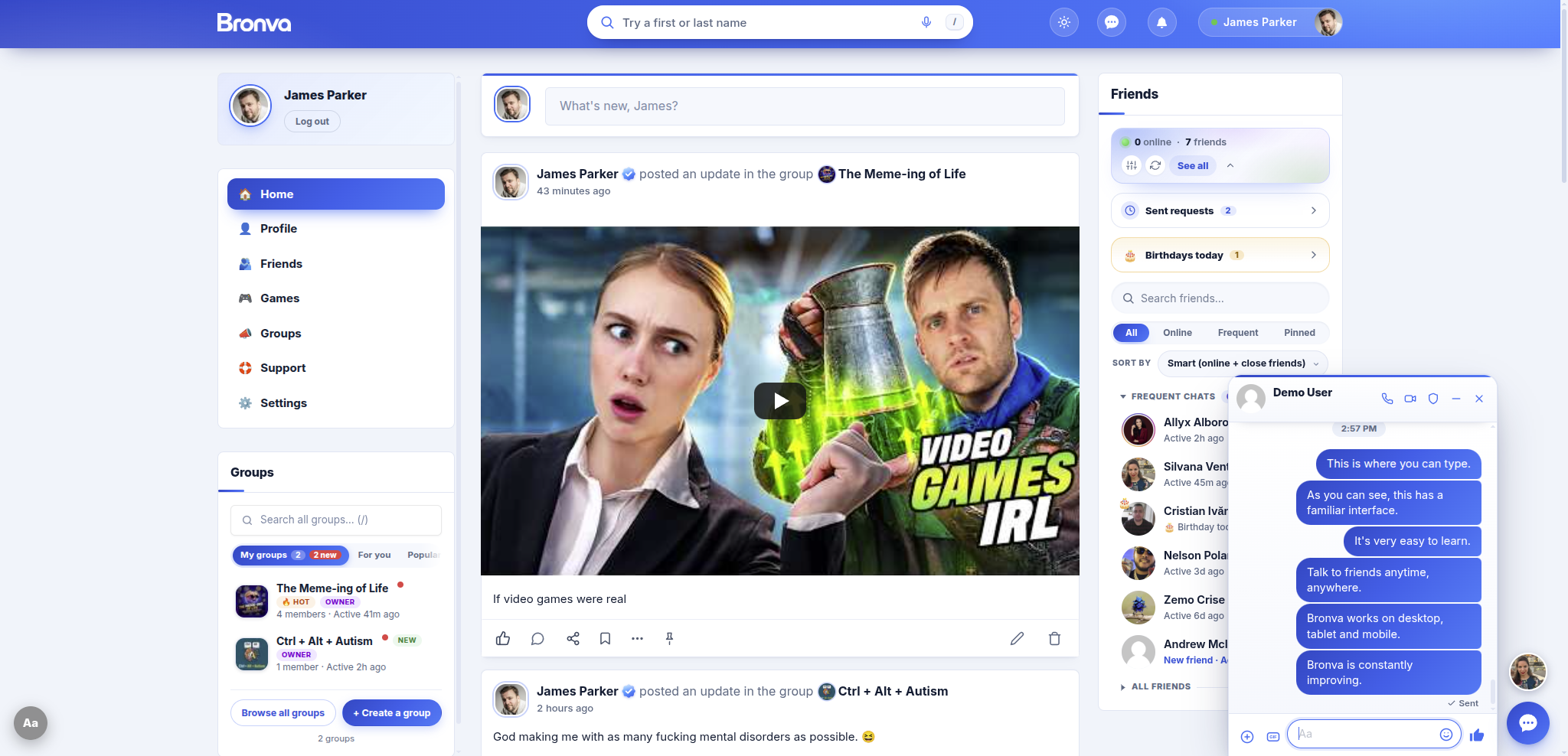


Choose your path
Tell us who you are and we’ll show you where to begin.
👋 I’m brand new
Create your account, add a photo and say hello.
🔒 I want more privacy
Choose who sees what, and hide yourself from search.
👥 I run a group
Set up, invite, moderate and grow your community.
🛡️ Something’s wrong
Report it, block someone or find support near you.
I want to…
Tell us what you’re trying to do and we’ll point you to the right guide.
| I want to… | Go to |
|---|---|
| Create an account | Creating an Account |
| Reset my password | Resetting Your Password |
| Change my profile picture | Changing Your Profile Photo |
| Add or change my cover image | Changing Your Cover Image |
| Make my profile private | Profile Privacy |
| Hide that I’m online | Online Status · Messenger Privacy Settings |
| Find someone I know | Finding Other Members |
| Send or accept a friend request | Friend Requests |
| Start a group | Creating and Managing Groups |
| Post photos | Photo Sharing |
| Schedule a post for later | Scheduled Posts and Drafts |
| Make a poll | Polls and Voting |
| Hide spoilers or sensitive content | Post Formatting and Content Warnings |
| Save a post to read later | Saved Posts and Bookmarks |
| Send a voice message | Voice Messages |
| Make a voice or video call | Voice and Video Calls |
| Take back or edit a message | Editing, Unsent and Scheduled Messages |
| Stop alerts at night | Chat Notifications and Quiet Hours |
| Block or mute someone | Blocking and Muting |
| Report a post, comment or message | Reporting Content |
| Report something I believe is illegal | Reporting Illegal Content |
| Appeal a decision | Moderation Appeals |
| Change my cookie choices | Managing Cookie Preferences |
| Download a copy of my data | Downloading Your Information |
| Delete my account | Deleting Your Account |
| Add Bronva to my phone | Installing Bronva as an App |
| Use Bronva in another language | Languages and Translation |
| Make text bigger or reduce motion | Accessibility Features |
| Invite friends | Invitations and Referrals |
| Tell you about a bug | Reporting a Problem |
| Suggest an idea | Suggest a Feature |
New here? Get started in five steps
Most people are up and running in a few minutes.
Create your account
Join free with your name, email and date of birth. Members must be 16 or over.
Confirm your email
Click the link we send you and you’ll be signed in and taken to your feed.
Complete your profile
Add a photo and a few details so friends can recognise you.
Find your people
Search for friends and family, send requests and join groups.
Say hello
Write your first post or start a chat in Bronva Messenger.
Create your free account Log in Read the full Getting Started guide
✅ Your first-day checklist
Tap to tick items off as you go. (Your ticks are just for you and reset if you reload the page.)
Your first week on Bronva
A relaxed plan to help you settle in. Do as much or as little as you like.
- Day 1
Join and say hello
Create your account, confirm your email, add a profile photo and write a first post.
- Day 2
Find your people
Search for friends and family, send a few friend requests and check “People you may know”.
- Day 3
Tune your privacy
Open your privacy settings, pick a preset and decide who can see your profile, friends and photos.
- Day 4
Join a group
Browse the groups directory by topic, or tap “Surprise me” and see where it takes you.
- Day 5
Try Messenger
Open the docked chat, send a message, a photo or a voice note, and set your quiet hours.
- Day 6
Take a games break
Play something quick on Bronva Games and save your favourites with the heart.
- Day 7
Make it yours
Choose your language, text size and theme, install Bronva on your home screen and invite a friend.
Browse by topic
Not sure where to look? Tap a topic to jump to it.
Most-read guides
The pages our members visit most.
Your account
Joining, signing in and getting back in if you’re locked out.
Your profile
Make your profile feel like you.
Posts and photos
Share updates, photos, polls and more.
Bronva Messenger
Chat from anywhere on Bronva. Messenger lives in a handy docked window, so there’s no separate page to open.
Messenger quick tips
- Press the sparkle button in Messenger to switch hidden surprises on or off.
- Drag-and-drop files, paste a screenshot, or choose up to ten attachments at once.
- Type / in a chat to see quick commands and your saved quick replies.
- Unsend your own message within fifteen minutes, or schedule one to send later.
- Use the privacy blur if you’re chatting somewhere other people can see your screen.
- Photos and videos from people who aren’t your friends are blurred until you tap them.
Bronva Games
Free games that play instantly in your browser. Nothing to download, no extra sign-up.
Games tips and tricks
- Use the heart on any game card to save a favourite. Your favourites are stored on your own device.
- Press / or Ctrl + K on the Games pages to search quickly, or tap “Surprise me” for a random game.
- On a phone, tap the game to play full screen, and rotate your device if the game suggests it.
- Most games run best in an up-to-date browser. If one won’t load, try another browser or refresh the page.
Browse every game category
- 💥 Action
- 🗺️ Adventure
- 🕹️ Arcade
- ⚔️ Battle
- ♟️ Board
- 🏗️ Builder
- 🃏 Card
- 🎰 Casino
- 🎨 Design
- 🎓 Educational
- 🥊 Fighting
- 👻 Horror
- ⏳ Idle
- 🔷 Match
- ➕ Merge
- 👥 Multiplayer
- 🎵 Music
- 🧩 Puzzle
- ⚡ Quick-play
- ❓ Quiz and trivia
- 🏎️ Racing
- 🧙 Role-playing
- 🏃 Runner
- 🧪 Simulation
- ♠️ Solitaire
- ⚽ Sport
- ♞ Strategy
- 🏕️ Survival
- 🔤 Word
Settings, privacy and safety
You’re in control of what you see, share and receive.
Your information and problems
Your data is yours. Here’s how to manage it and how to get help.
More help and information
Explore our features, safety information and policies.
Safety, moderation and community standards
Bronva values freedom of expression and a safe, respectful community. Here is how both work together.
Report something
Use the Report button on any post, comment, profile or chat message. Choose the closest reason and add details if you can.
Block or mute
Blocking hides you from each other and is never announced. Muting is a quiet break from one person’s posts and alerts.
Age rules
Bronva is for people aged 16 and over. Members aged 16 and 17 get the strongest privacy and safety settings automatically.
Fair decisions
If content is hidden or an account is limited, you can appeal. We explain our decisions and welcome a second look.
No guides found. Try a different word, or email our support team and we’ll help.
Limits at a glance
A handy cheat sheet of the numbers people ask about most.
| Feature | Limit |
|---|---|
| Minimum age to join | 16 years old |
| Username length | 4 to 60 characters (lowercase letters, numbers, underscores and hyphens) |
| Password length | At least 12 characters, with upper and lower case, a number and a symbol |
| First and last name | Up to 50 characters each |
| Photos in one post | Up to 10 |
| People tagged in one post | Up to 10 |
| Poll options | 2 to 6 choices |
| Colourful-background posts | Short text posts of up to 200 characters |
| Scheduled posts | Up to 90 days ahead (text posts) |
| Pinned friends | Up to 20 |
| Muted words or phrases | Up to 50 |
| Files in one chat message | Up to 10 attachments |
| Voice message length | Up to 3 minutes |
| Video message length | Up to 1 minute |
| Unsend a message | Within 15 minutes of sending |
| Scheduled chat messages | Up to 30 days ahead |
| Status message | Up to 60 characters |
| Away message | Up to 300 characters |
| Quick replies | Up to 12 |
| Call invitation link | Expires after 2 hours |
Limits can change as Bronva improves, and some protective limits aren’t listed here. If you hit a limit and it seems wrong, please tell us.
🖼️ What files can I share?
✅ Accepted
- Photos: JPG, PNG, GIF and WebP (checked by their real contents)
- Animated GIFs keep moving
- Documents in chat: PDF, Word, Excel, PowerPoint, text and CSV
- Voice and video notes recorded in the chat
- Audio files and YouTube or Vimeo links
🚫 Not accepted
- Programs, installers and scripts
- Web pages and macro-enabled files
- Anything whose contents look like code, whatever the file is called
- Extremely large images (they are resized, but there are size limits)
Photos are automatically rotated the right way up, resized and tidied, and hidden location and camera details are removed to protect your privacy.
Reactions, icons and what they mean
A quick visual guide to the buttons and symbols you’ll see around Bronva.
Post reactions
On a computer, hover over the reaction button. On a phone or tablet, press and hold. Tap the count to see who reacted.
Chat reactions
The post box extras
Status and badges
| Symbol | Meaning |
|---|---|
| Green dot | A friend is online right now |
| Amber dot | A friend has been away for a little while |
| Red badge | You have unread messages or requests |
| 🔵 Blue seal with a tick | A verified Bronva account |
| 🏷️ Staff, Moderator, Founder, Supporter, Creator | Badges awarded by the Bronva team next to a name |
| 🎂 Small cake | It’s that friend’s birthday today |
| 🆕 “New friend” | You became friends within the last week |
| 📝 Note icon | You’ve written a private note about that friend, visible only to you |
| ✏️ “Edited” | The post or comment was edited after publishing |
| 📌 Pinned | A moderator has pinned the post to the top of the feed |
Search like a pro
Bronva’s search works while you type. A few tricks make it even faster. (Search is available to signed-in members.)
| Try this | What happens |
|---|---|
| / or Ctrl + K | Jumps to the search box from almost anywhere |
| A first and last name, in any order | Finds people even if you swap the words |
| @username | Goes straight to that member |
| A pasted profile link | Finds the member it belongs to |
| people: groups: posts: | Limits results to one type |
| A nickname, like Jim for James | Common nicknames are understood |
| A word with accents, or without | “jose” finds “José” |
| A word plus a town | Finds people in a place, if they share it |
| “messages”, “settings”, “notifications” | Offers a direct “Go to” shortcut |
| A slightly wrong spelling | Bronva suggests a correction |
Where to find your settings
Everything you can adjust, and where it lives.
| Area | What you’ll find there |
|---|---|
| 📧 Emails | Email and password, notification emails, marketing preferences, security alerts, pause emails, quiet hours |
| 🔒 Privacy & Legal | Who can find you, what each person can see, tagging and invites, privacy presets, Lock down, devices, sign-in security, data downloads, requests and your rights |
| 💬 Messages & Chat | Sounds, status, receipts, away message, quick replies, appearance, link previews, hidden surprises |
| 🚫 Blocked & muted people | See and restore anyone you’ve blocked or muted |
| ♿ Comfort & accessibility | Text size, contrast, motion, fonts, reading aids, wellbeing tools and quick exit |
| 🎨 Profile accent colour | Blue, purple, green, orange, pink, teal or red |
| 🌐 Language | Interface language, translation and time display |
| 🍪 Cookie settings | Reopen your cookie choices from the small cookie button or the Cookie Policy page |
Tip: settings pages have a search box, collapsible sections, a pinned Save button and a Discard button. Press Ctrl + S to save.
Privacy presets: which one is for you?
In your Privacy & Legal settings you can apply a ready-made preset in one tap, then fine-tune it later. Pick a tab to see the idea behind each.
🌐 Open
Best if you want to be easy to find, for example if you’re building a following or reconnecting with old friends.
- More of your profile is visible
- You’re easier to find in search and the members directory
- Great for creators and community builders
⚖️ Balanced
A sensible middle ground for most people. Friends see more than strangers do.
- Friends can see your details
- You’re still discoverable by people who know your name
- Easy to adjust later
🔐 Private
For people who prefer a smaller circle. Your content is mainly for friends.
- Most things are friends-only
- Less visible in search
- Tagging and invites are more restricted
🛑 Maximum privacy
The most protective settings in one tap. Ideal if you need to step back or feel unsafe.
- Your profile and activity are as hidden as possible
- Choose “Lock down” for the same effect instantly
- The “Panic” button also pauses your account and signs out other devices
The exact settings in each preset can be improved over time. You can always change individual options afterwards, undo your last save or reset to defaults. Members aged 16 and 17 have their safest options locked until they turn 18.
How reporting works
Reporting is quick, and you stay in control of what you see while we look into it.
- Step 1
Press Report
Use the Report button on a post, comment, profile or chat message and choose the closest reason.
- Step 2
Add details
Optional, but helpful. In chats, the recent messages can be included as evidence.
- Step 3
Protect yourself
You can block the person in the same step, or mute them, so you don’t have to see more from them.
- Step 4
We review
Our team reviews reports, and the most serious reasons are prioritised. Content may be hidden while it is checked.
- Step 5
Decisions and appeals
If action is taken, the person is told why and how to appeal. You can ask us to look again if you disagree with an outcome.
Reasons you can choose
- ⚖️ Illegal content
- 🧒 Child safety
- 💔 Suicide or self-harm
- 😠 Harassment
- ⚠️ Threats
- 🚫 Hate
- 📧 Spam
- 🎣 Scams
- ❔ Something else
Also report to the authorities
Some things should also go to the specialists. These independent services can act in ways that Bronva can’t:
🧒 Child sexual abuse material
In the UK: the Internet Watch Foundation. In the US: the NCMEC CyberTipline. Elsewhere, contact your national hotline or police.
🧑⚖️ Online grooming or exploitation
In the UK, report to the CEOP Safety Centre. Elsewhere, contact your local police or child protection service.
🎣 Fraud and scams
Report to your national fraud-reporting service, for example reportfraud.ftc.gov in the US, or your bank straight away if you’ve paid someone.
🚨 Immediate danger
Call your local emergency number first. Then tell us so we can help preserve and review what happened.
Reporting Content · Reporting Illegal Content · Content Moderation · Moderation Appeals
Notifications explained
Choose exactly how, and how often, Bronva gets your attention.
| Type | Where you’ll see it |
|---|---|
| 🔔 Notification bell | The bell in the header shows reactions, comments, tags, requests and more |
| 💬 Unread chat badge | A red number on the chat button, the browser tab and the installed app icon |
| 🖥️ Desktop alerts | Pop-ups from your browser, only while Bronva is in the background |
| Notification emails, daily or weekly summaries and security alerts | |
| 🔕 Quiet hours | Times you choose when alerts and sounds stay silent |
| 😴 Snooze or pause | Silence chats for an hour, or pause notification emails for a day, a week or longer |
| 🧹 Clear all | “Clear all notifications” in any notification menu removes the lot |
Groups: public, private and hidden
Pick the right kind of group, or understand what you’re joining.
| 🌍 Public | 🔒 Private | 🙈 Hidden | |
|---|---|---|---|
| Shown in directory | Yes | Yes | No |
| Appears in searches | Yes | Yes | No |
| How to join | Instantly | Ask to join, then be approved | Invitation only |
| Best for | Open communities and hobbies | Clubs, teams and interest groups | Close circles and families |
Handy things group admins can do
- Change the group photo and cover image, with drag and drop and an Undo option.
- Invite friends, copy the group link, or share it by WhatsApp, X, Facebook or email.
- Manage members, promote moderators and remove or ban people.
- Delete posts from the group’s feed.
- Use the welcome card and conversation starters to get the first post going.
Set up Bronva on your device
Pick your device for quick tips. Full steps are in Installing Bronva as an App.
📱 On a phone
- Open Bronva in your browser and sign in.
- Open your browser’s menu or share button.
- Choose “Add to Home Screen”.
- Open Bronva from your home screen like any other app.
Chats open as a sheet from the bottom. Press and hold the reaction button to choose a reaction.
📲 On a tablet
You get a roomier layout with the same features. Add Bronva to the home screen in the same way as on a phone, and keep chats docked while you browse. Rotate your device if a game suggests it.
💻 On a computer
- Hover over a reaction button to pick a reaction.
- Keep several chat windows open at once, or shrink them to bubbles.
- Use keyboard shortcuts like / to search and J / K to move between posts.
- Some browsers offer an “Install” button in the address bar.
🧩 Once installed
- An unread badge appears on the app icon.
- If your connection drops, you’ll see a friendly offline page.
- Shortcuts to Activity, Members, Groups and Messages are available from the icon on some devices.
- Updates arrive automatically, with nothing to download.
Being a great member
Bronva works best when people are kind, curious and honest. Here’s how to help keep it that way.
💬 Disagree well
Challenge ideas, not people. Strong opinions are welcome. Personal attacks aren’t.
🧐 Pause before posting
If you’re angry, wait a minute. The post box remembers your draft until you’re ready.
🔒 Protect others’ privacy
Don’t share someone else’s photos, address, phone number or private messages without permission.
⚠️ Use content warnings
Cover spoilers or sensitive topics so people can choose whether to read them.
🙅 Respect boundaries
If someone says no, or stops replying, leave them be. Mute or block if you need to.
🌱 Keep it positive
Bronva is built around friends, fun and people you actually know. Share things that make days better.
🔎 Check before sharing
Look twice at surprising claims and links before you repost them.
🚩 Report, don’t retaliate
If something breaks the rules, report it instead of replying in kind.
For parents, carers and trusted adults
Bronva is for people aged 16 and over. If a young person in your life uses Bronva, here is how we help look after them.
🔞 A firm age rule
People who say they’re under 16 can’t join. Accounts found to belong to someone under 16 are hidden at once and then deleted, with the owner emailed and offered a way to download their data.
🛡️ Extra protection at 16 and 17
These members automatically get their strictest settings locked on until they turn 18, including a friends-only profile, hidden from the directory and search engines, with a private friends list, friends-only groups, photos, tags and invites, and no personalised suggestions or partner offers.
⚠️ Chat safety warnings
Messenger shows warnings about scams, pressure, risky links, requests to move to another app and signs someone may be struggling. Warnings are shown, never silently hidden, so the member can decide.
🚫 Block, mute and report
Anyone can block, mute or report from any chat, profile or post. Blocking is never announced.
Conversation starters
- “Who do you talk to on Bronva? Do you know them in real life?”
- “What would you do if someone asked you for money, photos or secrets?”
- “Do you know how to block and report? Let’s try it together.”
- “You can always tell me if something feels wrong, and you won’t be in trouble.”
Worried about a young person’s safety? See how reporting works, visit the Protecting Younger Members page, or contact us at support@bronva.com.
Support lines around the world
If you’re struggling, you’re not alone. These services are free, confidential and staffed by people who want to help.
| Region | Emergency | Emotional support |
|---|---|---|
| 🇬🇧 United Kingdom | 999 | Samaritans 116 123, any time. Childline 0800 1111 for under-19s |
| 🇮🇪 Ireland | 112 or 999 | Samaritans 116 123 |
| 🇺🇸 United States | 911 | 988 Suicide & Crisis Lifeline: call or text 988 |
| 🇨🇦 Canada | 911 | 9-8-8 Suicide Crisis Helpline: call or text 9-8-8 |
| 🇦🇺 Australia | 000 | Lifeline 13 11 14 |
| 🇳🇿 New Zealand | 111 | Need to talk? Call or text 1737 |
| 🇪🇺 European Union | 112 | Varies by country. See the directory below |
| 🌍 Anywhere else | Your local number | findahelpline.com lists free support lines worldwide |
Numbers can change, so please double-check locally. Bronva’s Safety Centre and the support directory in your Privacy & Legal settings can open on your own country.
Healthy scrolling on Bronva
⏰ Break reminders
Get a gentle nudge after a long session, plus late-night reminders.
⏳ Daily time limit
Set a daily limit, with a pause-or-stop choice. The timer stays on your device.
🌙 Night tint and greyscale
Calm your screen down in the evening, or take the colour out of it altogether.
🛡️ Feed shield and mute words
Hide the feed until you choose to open it, and mute up to 50 words or phrases you’d rather not see.
🚪 Quick exit
A red button (or pressing Esc three times) that leaves the site straight away if you need privacy.
🌿 Calmer by design
No endless negativity. Bronva focuses on friends, fun and the people you actually know.
Made for the whole world
Wherever you are, Bronva speaks your language, keeps your time and respects your privacy rights.
Messenger languages include
- English
- Español
- Français
- Deutsch
- Português
- Italiano
- Nederlands
- Türkçe
- Русский
- العربية
- हिन्दी
- Bahasa Indonesia
- 日本語
- 한국어
- 中文
- Polski
- Українська
- Tiếng Việt
- ไทย
- עברית
- فارسی
- বাংলা
- Kiswahili
🔤 Right-to-left
Text direction follows each post’s language, and you can choose left-to-right or right-to-left for the whole page.
🕐 Your own time zone
Times show in your own time zone, and you can pick exact dates and times instead of “2 hours ago”.
🔁 Translate posts
Posts in another language show a Translate link that works privately on your device where your browser supports it.
⚖️ Your rights, your region
Privacy & Legal settings summarise data rights for the UK, EU, US, Canada, Brazil, Australia, New Zealand, India, South Africa, Japan, Singapore and South Korea, and open on your region automatically.
🛑 Global Privacy Control
If your browser sends a Global Privacy Control signal, Bronva switches on your worldwide opt-outs automatically at sign-in.
📞 Local help lines
Choose your country in settings and the Safety Centre shows the right emergency and support numbers.
Psst… hidden surprises
Bronva has a secret side. We won’t spoil it, but here’s what you need to know.
🔎 Go looking
Hundreds of secret words, codes and gestures trigger animated surprises. Some come with sound. Try typing things in chats and see what happens.
🏆 Collect achievements
Every secret you find unlocks a funny achievement and moves you up the ranks, from Egg Tourist all the way to Egg Lord.
✨ Switch them off
Press the sparkle button in Messenger to turn surprises off. If someone sends you a secret word, they’ll be told you have surprises switched off.
🛑 Stop everything
Press Esc at any time to stop every animation, sound and voice immediately. If you’ve asked your device for reduced motion, you’ll see a short text message instead.
Myths and facts
A few things people often wonder about.
❌ “I’ll be banned for disagreeing.”
✅ Disagreement, criticism and unpopular views don’t automatically lead to removal. Threats, harassment, exploitation and illegal material do.
❌ “Blocking someone tells them.”
✅ Blocking is never announced.
❌ “I need to download an app.”
✅ Bronva works in your browser. Installing it on your home screen is optional.
❌ “Games need another account.”
✅ Bronva Games is free, plays instantly and needs no sign-up.
❌ “Hiding my status hides me from everyone.”
✅ It only hides when you’re active. Your profile follows your privacy settings.
❌ “Everyone can see my date of birth.”
✅ It’s only used to check your age and is never shown to other members.
What we stand for
The ideas that guide every improvement.
🗣️ Free expression
Open conversation, with clear lines against genuine harm.
🧼 Simplicity
Make things easier, not harder. No clutter, no maze of menus.
🔒 Privacy
Your information, your choices, with privacy-friendly defaults.
🛡️ Safety
Tools to report, block and get help, and fair appeals.
⚡ Speed
Fast on every device, even on slow connections.
🌱 Constant improvement
Small and big upgrades arrive all the time.
🤝 Community first
Features are added because members need them.
🌍 Everyone welcome
Built for a global community aged 16 and over.
Our Mission · Our Story · Continuous Improvement · Meet the Founder · What’s New
Why Bronva exists
A short story about a social network built to feel familiar, without the junk.
Bronva was created because too many people lose their friends, photos and memories overnight through mistakes, mix-ups and automated errors. Bronva puts people first: freedom of speech and expression, a fair route to appeal and a calm, clean space that’s fast and easy to use. It feels familiar, but all the clutter has been removed.
It’s built by one independent founder, James Parker, who is obsessed with making things simpler, faster and better. New features are added when the community needs them, not to fill the screen. You can speak to him directly and ask for improvements.
What happens when…?
Quick answers about what different actions actually do.
| If you… | Then… |
|---|---|
| Block someone | Any friendship ends, you’re hidden from each other in chats, feeds, search and the members list, and they can’t message, comment or tag you. It’s never announced. |
| Mute someone | Their posts and alerts are silenced for a time you choose, and they aren’t told. |
| Hide a post | It disappears from your feed only. You can restore hidden posts later. |
| Unsend a chat message | It’s removed for everyone, along with any attached file. This works within 15 minutes of sending. |
| Archive a chat | It’s hidden from your list until a newer message arrives. |
| Unfriend someone | You stop being friends. Tap twice to confirm. You can send a new request later. |
| Pause your account | Your profile is hidden for the time you choose, from a week up to until you switch it back on. |
| Delete your posts | You can permanently delete all your posts and comments after a password check. |
| Delete your account | Your account is closed after you enter your password and type DELETE, and you’re sent a confirmation email. Download your data first if you want a copy. |
| Leave an account unused for a long time | If you switch on the option, you’re warned by email before an unused account is deleted. |
| Report a post | Our team reviews it. Enough reports from established members may hide it while it’s checked. |
| Community goes read-only | Posting and some actions are paused temporarily while we carry out urgent safety or maintenance work. Reading still works. |
Quick checkups
Three short checklists to keep your account tidy and safe. Tap to tick them off. (Your ticks reset if you reload.)
⏱️ The 60-second privacy checkup
🔐 The security checkup
📆 The monthly tidy-up
Locked out? Getting back in
Follow these steps in order. Most people are back in within minutes.
- Step 1
Check the basics
Is Caps Lock on? Are you using the same email or username you signed up with? Try typing your password in a note first to check it, then paste it in.
- Step 2
Reset your password
Choose “Forgot your password?” on the login page and tap “Email me a reset link”. Check your spam and junk folders too.
- Step 3
Wait if you’re paused
After several wrong attempts, logging in pauses for about 15 minutes to protect your account. Wait, then try again.
- Step 4
Check your email for a notice
If your account was restricted or paused, we’ll have emailed you with the reason, how long it lasts and how to appeal.
- Step 5
Contact us
Email support@bronva.com with your username and what you’ve tried. Please never send your password.
Making a data or rights request
You can ask us about the information Bronva holds about you, wherever you live.
- Step 1
Open Privacy & Legal
Go to your settings and find the requests form in the Privacy & Legal area.
- Step 2
Choose a request type
Correction, restriction, objection, more information, human review of an automated decision, withdrawing consent, a complaint, a content appeal or a safety concern.
- Step 3
Submit it
Each request gets a reference number and a reply date within one month, and you’ll get a confirmation email.
- Step 4
Track it
Your past requests are listed in your settings so you can see their status.
Cookies and consent
Nothing optional runs until you say so, and rejecting is as easy as accepting.
| Category | What it’s for | Default |
|---|---|---|
| 🔧 Strictly necessary | Keeps you signed in, protects Bronva from spam and attacks, makes messaging work and remembers your own settings and cookie choices | Always on |
| 📊 Analytics | Anonymous, aggregate usage measurement so problems can be found and Bronva can be improved | Off |
| 🎨 Preferences | Remembers display choices | Off |
| 📣 Marketing | Measures promotions, such as hosting or VPN offers | Off |
- When you first visit, a card offers Reject all, Accept all and Manage choices, with equal prominence.
- Your choices are remembered for about six months, and you can change them any time using the small cookie button or the “Cookie settings” link.
- You’ll be asked again if the cookies we use change in an important way.
- If your browser sends a Global Privacy Control signal, we can treat it as a rejection.
- A dated record of your choices is kept so you can see it, export it or have it erased.
Cookie Policy · Cookie Settings · Managing Cookie Preferences
Emails you might get from Bronva
So you can tell what’s genuine.
| When you’ll get it | |
|---|---|
| Confirm your email | Straight after you sign up. Clicking the link signs you in |
| Password reset link | Only when you ask for one |
| Security alerts | New device sign-ins, repeated failed sign-ins and changes to your settings, if switched on |
| Notification emails | Activity you’ve chosen to hear about, with daily or weekly summaries available |
| Unread-message reminder | Only if you’ve been away for a while. It shows counts only, never message text |
| Weekly digest | Only if you opt in |
| Report outcome or hidden post | When a report you made is resolved, or when one of your posts is hidden, with how to appeal |
| Invitation from a friend | When a member invites you. Every invitation has a one-click opt-out |
| News and offers | Only if you’ve said yes. Each one has an unsubscribe link |
How we look after your data, in plain English
A summary. For the full detail, read our Privacy Policy.
📷 Photos
Hidden location and camera details are removed, and files get random names so original file names never leak.
🎂 Date of birth
Used only to check your age. It isn’t shown to other members.
🔑 Passwords
Never kept in the temporary sign-up draft, and never emailed to you.
🍪 Consent records
Stored with a shortened IP address and deleted automatically after about two years.
🧾 Sign-in history
IP addresses are partly hidden when shown to you, and you can clear your history or stop it being kept.
🧹 Your control
Download it, correct it, restrict it or delete it. Set automatic deletion of old posts and notifications if you like.
🤖 AI and search engines
You can ask AI companies not to use your text and photos for training, and ask search engines not to keep cached copies.
🚫 No surprise sharing
Sharing with trusted partners, personalised suggestions and research use are off until you choose otherwise.
Browsers and connections
Bronva is built with modern technology, so it works best in an up-to-date browser.
| Browser | Notes |
|---|---|
| Google Chrome | Full support on computers and Android. Install option in the address bar |
| Safari | Full support on iPhone, iPad and Mac. Use “Add to Home Screen” from the share menu |
| Mozilla Firefox | Full support. Home-screen install is available on Android |
| Microsoft Edge | Full support, with an install option in the menu |
| Samsung Internet and others | Work well when kept up to date |
- Slow connection? Turn on the data saver and reduced-motion options. Bronva also lightens itself when it senses a slow network.
- Offline? You’ll see a banner and, if installed, a friendly offline page. Everything syncs when you’re back.
- Old browser? Update it for the best speed and security.
- Extensions: some blockers can interfere with uploads, calls and games. Try pausing them for Bronva.
Online safety words explained
Knowing the name of a trick makes it easier to spot.
- Phishing
- A fake message or website that tries to trick you into handing over passwords or payment details.
- Catfishing
- Pretending to be someone else online, often to win trust.
- Doxxing
- Sharing someone’s private details, like their address, without permission.
- Cyberbullying
- Repeated unkind or threatening behaviour online. Block, report and tell someone.
- Blackmail
- Threatening to share private images or information unless you pay or do something. Don’t pay, stop replying, keep evidence, block and report.
- Impersonation
- Someone using another person’s name or photo. Report the profile.
- Romance scam
- Someone builds a close online bond, then asks for money.
- Spoofing
- Making a message or link look like it came from somewhere trusted.
Ideas to get you started
Not sure what to post, or which group to join? Try one of these.
First-post ideas
- 👋 Introduce yourself
- 📸 Share a photo from today
- 📊 Ask a fun poll question
- 🎵 What are you listening to?
- 📚 What are you reading?
- 🍲 What’s for dinner?
- 🌤️ Weather where you are
- 🎮 Your favourite game
- 🎉 A life update
- 🐾 Meet your pet
Group topics to explore
- 🎮 Gaming
- 🎶 Music
- 📖 Books
- 💪 Fitness
- 💻 Tech
- 🎨 Art
- 🍕 Food
- ✈️ Travel
- 😂 Memes
- 🐶 Pets
- 📷 Photography
- 🌱 Gardening
Quick fixes for common problems
Most little hiccups can be sorted in under a minute. Open a topic to see what to try.
I can’t log in
- Check you’re using the email or username you signed up with, and that Caps Lock is off.
- Choose “Forgot your password?” to get a reset link.
- Look in your spam or junk folder for the email.
- After several wrong attempts, logging in pauses for a short while. Wait about 15 minutes and try again.
- Still stuck? Email support@bronva.com.
My confirmation email hasn’t arrived
- Check spam, junk and “promotions” folders.
- Make sure there are no typos in your email address. We suggest corrections for common mistakes when you sign up.
- Add support@bronva.com to your contacts and try again.
- If it still doesn’t arrive, contact us and we’ll help.
My photo won’t upload
- Use a real JPG, PNG, GIF or WebP image. Other file types are not accepted.
- Very large images are shrunk automatically, but extremely large files may take longer on a slow connection.
- You can add up to ten photos to one post.
- If you’ve uploaded a lot in a short time, wait a little and try again.
- Try a different browser or turn off any extensions that block uploads.
A page looks broken or won’t load
- Refresh the page, or close and reopen it.
- Update your browser to the latest version.
- Check your internet connection. Bronva will tell you if you go offline.
- Try a private or incognito window to rule out an extension.
- Still wrong? Use Reporting a Problem and tell us your device and browser.
I’m not getting notifications
- Open your notification settings and check that the alerts you want are switched on.
- Check Quiet hours and Snooze in Messenger. They silence alerts on purpose.
- Allow desktop or phone notifications for Bronva in your browser or device settings.
- Look for emails in spam, and check you haven’t paused notification emails.
I can’t see someone’s profile or posts
They may have set their profile to friends-only or private, paused their account, or blocked you. Bronva never announces a block, so a missing profile is not always one. Members can only see what the owner has chosen to share.
My message or post is missing
- A post may have been hidden after reports. You’ll be emailed with the reason and how to appeal.
- You may have hidden it yourself. Look for the option to restore hidden posts.
- Messages you unsent are removed for both people.
Calls, voice notes or the camera aren’t working
- Allow microphone and camera access for Bronva when your browser asks.
- Check no other app is already using your camera or microphone.
- Call links open in a new tab, so make sure pop-ups aren’t blocked for Bronva.
- Calls are available between friends.
Pages feel slow on my connection
Turn on the data-saver and reduced-motion options in your display settings. Bronva also lightens itself automatically on slow connections and in your device’s data-saver mode.
A message says “You can’t join Bronva yet”
Bronva is for people aged 16 and over, so sign-ups from younger people can’t be completed. No account is created and the date entered isn’t kept. If you’re 16 or older and entered your date of birth by mistake, wait a little while and try again, then email support@bronva.com if it continues.
I’m asked to add my date of birth
Older accounts may be asked for a date of birth so we can check age and apply the right protections. Once it’s saved it can’t be edited, so please enter it carefully.
I can’t tag someone, comment or message them
- They may have limited who can tag them or message them.
- You may have blocked each other, which stops comments, tags and messages both ways.
- Brand-new accounts have a few protective limits for the first day, such as limits on links and posts.
- Community-wide read-only mode may be on while we carry out maintenance or safety work.
GIFs or link previews aren’t showing
- Check you haven’t turned on “Hide link previews” or “Pause GIFs until tapped” in your display settings.
- Data-saver mode loads images only when needed.
- GIFs are filtered to a teen-friendly rating, so some results won’t appear.
Times or language look wrong
Choose your language in your settings and check that your device’s time zone is correct. Bronva shows times in your own time zone. Posts in other languages show a Translate link.
I can’t send a file in a chat
- Programs, scripts, web pages and code-like files are always refused, whatever they’re called.
- You can attach up to ten files at a time.
- Try a PDF, Word, Excel, PowerPoint, text or CSV document instead.
My account is paused or restricted
You’ll have been emailed with the reason and the date it ends. You can appeal. See Account Suspensions and Restrictions and Moderation Appeals.
A game won’t load or is slow
- Press play and wait a moment. Games only load once you tap them.
- Refresh the page, or try another browser.
- Turn off extensions that block embedded content.
- Tell us the game’s name and your device and we’ll look into it.
I can’t install Bronva on my home screen
Use your browser’s own “Add to Home Screen” or “Install” option. Some in-app browsers don’t offer it, so open Bronva in your normal browser first. The install prompt is held back until you’ve dealt with the cookie banner.
Keep your account secure
A few minutes now can save a lot of trouble later.
Strong, unique password
Use at least 12 characters with a mix of letters, numbers and symbols, and never reuse a password from another site. Our “Suggest a strong password” button can create one for you.
Password manager
A password manager remembers everything for you so you only need one strong master password.
Check your devices
In your privacy and security settings you can see every device that’s signed in and sign out of all the others in one tap.
Auto sign-out
On shared or public computers, choose automatic sign-out after a period of inactivity, and always log out when you’re done.
Keep your email safe
Your email is how you reset your password, so protect it with its own strong password.
Panic button
If you ever feel unsafe, the panic option hides your profile, pauses your account, locks your privacy settings and signs out other devices.
🎣 Spotting scams and suspicious messages
- Requests for money, gift cards or crypto from someone you’ve only just met online are a classic warning sign.
- Pressure and urgency (“act now or lose your account”) is designed to stop you thinking.
- Too-good-to-be-true offers, prizes and investment “opportunities” are almost always scams.
- Odd links. Check where a link really goes before you open it. Bronva asks you to confirm before opening links in suspicious messages.
- Requests to move to another app or keep things secret are a red flag. Tell someone you trust and report it.
- Never share card numbers, passwords, one-time codes or ID documents in a chat.
If something feels wrong, trust your instincts: stop, block, report.
Handy shortcuts
Move around Bronva faster with your keyboard. (Mac users: use Cmd instead of Ctrl.)
| Shortcut | What it does |
|---|---|
| / or Ctrl + K | Start searching from almost anywhere |
| J / K | Move to the next or previous post or search result |
| Ctrl + Enter | Publish a post or send a reply |
| Esc | Close the top window, or stop any animation or sound |
| ? | Show the shortcut reminder |
| Ctrl + S | Save changes on a settings page |
| Tab / Shift + Tab | Move between links and buttons |
| Esc ×3 | Quick exit, if you’ve turned it on in your settings |
Some shortcuts only work on certain pages, and you can switch single-key shortcuts off in your display preferences.
Accessibility and comfort
Bronva is built to be comfortable for as many people as possible. Here’s some of what you can adjust.
Text and contrast
Change text size, increase contrast, use easier-reading spacing and underline links.
Light and dark
Follow your device, or pick light or dark yourself. Dark mode is easier on the eyes at night.
Reduced motion
Switch animations off, pause GIFs until tapped and turn off autoplay.
Screen readers
Pages use clear labels, a skip-to-content link and keyboard navigation throughout.
Languages
Use Bronva in your own language, see times in your own time zone and translate posts written in other languages. Right-to-left languages are supported.
Wellbeing tools
Set break reminders, a daily time limit, greyscale mode and a night tint to keep scrolling healthy.
Accessibility Features · Accessibility Statement · Display and Reading Preferences
Using Bronva on any device
Phone, tablet or computer, Bronva adapts to fit.
| Device | What to know |
|---|---|
| 📱 Phone | Chats open as a sheet from the bottom. Long-press a post’s reaction button to choose a reaction. Add Bronva to your home screen for an app-like experience. |
| 📲 Tablet | A roomy layout with the same features. You can keep chats docked while you browse. |
| 💻 Computer | Hover over a reaction button to pick a reaction, open several chat windows at once and use keyboard shortcuts. |
| 🧩 Installed app | Shows an unread badge on the app icon and an offline page if your connection drops. |
See Installing Bronva as an App for step-by-step instructions for your browser.
Bronva glossary
Plain-English meanings for words you’ll see around Bronva.
- Activity feed
- The live stream of updates, photos and conversations from you and your friends.
- Group
- A community around a shared interest. Public, private or hidden.
- Reaction
- A quick way to respond to a post: Like, Love, Care, Haha, Wow, Sad or Angry.
- Mute
- A quiet break from someone’s posts and alerts, without telling them.
- Block
- Removes any friendship and hides you from each other. It’s never announced.
- Content warning
- A click-to-reveal cover placed over a post that some people may prefer not to see.
- Verified badge
- A blue seal showing an account has been confirmed by Bronva.
- Docked messenger
- The chat window that sits at the bottom of the page wherever you are on Bronva.
- Quiet hours
- Times you choose when notifications and sounds stay silent.
- Pinned friend
- A friend you’ve fixed to the top of your friends list.
- Appeal
- A request for us to review a moderation decision.
- Data export
- A downloadable copy of the information Bronva holds about you.
- Lock down
- A one-tap setting that makes your account as private as possible.
- Panic button
- Hides your profile, pauses your account and signs out other devices.
- Quick exit
- A red button that leaves the site instantly for your privacy.
- Repost
- Sharing someone’s post to your own feed, with an optional comment.
- Check-in
- Adding a place to a post, with your exact location kept approximate.
- Hashtag
- A word starting with # that becomes a clickable search.
- Spoiler text
- Blurred text that stays hidden until someone taps it.
- Friends-only post
- A post that only confirmed friends, you and moderators can see.
- Message request
- A message from someone who isn’t yet your friend, kept separate until you accept.
- Archive
- Hides a chat until a newer message arrives.
- Consent log
- A dated record of the cookie and marketing choices you’ve made.
- Content warning
- See above. Often shortened to “CW”.
Why people love Bronva
Familiar to use, but with all the clutter removed.
⚡ Fast and light
Built with modern technology so pages load quickly on any device.
🧼 Clean and simple
Everything is easy to find, with no maze of hidden menus.
🗣️ Freedom of expression
A community that values open, respectful conversation.
💬 Messenger built in
Chat, voice notes, photos and calls without leaving the page.
🎛️ You’re in control
Privacy, notifications and display settings are yours to adjust.
🎉 Fun surprises
Hidden delights for people who go looking.
🛡️ Safety built in
Reporting, blocking, warnings and extra protection for younger members.
🌱 Always improving
New features arrive when the community needs them.
🌍 Made for everyone
Translate posts, use your own language and time zone, and enjoy right-to-left support.
🎮 Free games
Play instantly in your browser, with nothing to download.
🧘 Calmer by design
Focused on friends, fun and the people you actually know, not endless negativity.
📦 Your data, your choice
Download your information, clear your history or delete your account whenever you like.
🧑🤝🧑 Real names, real people
Profiles show your full name with your @username beneath, so friends can find you.
🔍 Smarter search
Find people, groups and posts quickly, even with a misspelling or a nickname.
🖼️ Beautiful photos
Photo grids, a zoomable viewer and automatic tidying of your pictures.
🤝 Listens to you
You can speak to the founder directly and suggest improvements any time.
Popular questions
🚪 Joining Bronva
How old do I have to be to use Bronva?
You must be 16 or over. Members aged 16 and 17 automatically receive our strongest privacy and safety settings until they turn 18.
Is Bronva really free?
Yes. Joining and using Bronva is free. Bronva Games is free too, with nothing to download.
Can anyone around the world join?
Yes. Bronva is open to anyone aged 16 or over, wherever they live. You can choose your language and your country so we can show you the right help lines.
Do I need to use my real name?
Your public display name is your first and last name together, shown with your @username beneath. If a name is missing, your username is shown instead.
I didn’t get my confirmation email. What should I do?
Check your spam or junk folder first, and make sure you typed your email address correctly. If it still hasn’t arrived after a few minutes, email support@bronva.com and we’ll help.
Why was my sign-up refused?
Sign-ups are refused for people under 16, for disposable or blocked email providers and when too many accounts are created from one network in a short time. Use a permanent email address, and contact us if you think a mistake has been made.
Can I have more than one account?
Please use one account per person. Repeated sign-ups to avoid a suspension or to spam others may be removed.
🔑 Logging in
I’ve forgotten my password.
Choose “Forgot your password?” on the login page and we’ll email you a reset link. See Resetting Your Password.
How long will I stay logged in?
“Keep me logged in” lasts 30 days. If you leave it unticked, you’ll be signed out after about two days. You can also choose automatic sign-out after inactivity in your security settings.
Why can’t I log in for a while?
After several wrong attempts, logging in pauses temporarily to protect accounts from password guessing. Wait about 15 minutes and try again, or reset your password.
🔒 Privacy
How do I make my account more private?
Open your settings and visit the privacy options, where you can choose who sees your profile, friends and photos, hide yourself from search, and more. See Changing Privacy Settings.
Can I hide when I’m online?
Yes. You can appear offline in your friends panel and hide your online status, “Seen” receipts and typing indicator in Messenger settings.
Can I stop search engines showing my profile?
Yes. In your privacy settings you can hide yourself from the members directory and ask search engines not to list your profile.
Who can see my date of birth?
It’s used only to check your age and is never shown to other members.
How are my photos handled?
Hidden location and camera information is removed from photos you upload, and every file gets a random name so original file names never leak.
What cookies does Bronva use?
Strictly necessary cookies keep you signed in and keep the site secure. Optional categories start switched off, and you can change your choices at any time. See Managing Cookie Preferences.
🛡️ Safety
How do I report something that worries me?
Use the Report button on any post or message. If someone is in immediate danger, call your local emergency number (for example 999 in the UK or 911 in the US). See Reporting Content and the Safety Centre.
What happens after I report something?
Reports are reviewed by our team. Content that receives enough reports from established members may be hidden while it is checked, and the author is told why and how to appeal. Serious reports are prioritised.
What isn’t allowed on Bronva?
Disagreement and unpopular opinions are fine. Threats, harassment, exploitation, illegal material and other serious misconduct are not. Read our Community Guidelines.
What if my content was removed by mistake?
You can appeal. We know mistakes can happen and we’ll take another look. See Moderation Appeals.
How do I block someone?
Open their profile, a chat or one of their posts and choose Block. They won’t be told, and each of you will be hidden from the other.
Someone is pressuring me or asking for money. What should I do?
Don’t send anything. Stop replying, block them and report the messages. Messenger shows warnings for common scam and pressure patterns, but you stay in control.
💬 Using Bronva
Where did the Messages page go?
Bronva Messenger is now a docked chat. Tap the round chat button in the bottom corner, or any “Message” button on a profile, to open a conversation in a popup window.
Can I edit a post after publishing?
Yes. Use the More menu on your post to edit it. An “edited” label may be shown.
Can I schedule a post?
Yes. Text posts can be scheduled to publish automatically up to 90 days ahead, and you can view or cancel scheduled posts.
Can I translate posts in other languages?
Yes. Posts written in a language other than yours show a Translate link. You can choose your target language or hide the link in your settings.
How do I add Bronva to my phone?
Use your browser’s “Add to Home Screen” option, or follow the prompt Bronva shows after a few visits. See Installing Bronva as an App.
👥 Friends and groups
What’s the difference between public, private and hidden groups?
Public groups can be seen and joined by anyone. Private groups are listed but need approval to join. Hidden groups don’t appear in searches or listings and are invitation only. See the comparison table.
Can I start my own group?
Yes. Choose “Create a group” in the groups directory and follow the guided steps. See Creating and Managing Groups.
How do I find people I know?
Use search, check “People you may know”, or share your personal invite link. Suggestions are based on things like shared friends, groups and interests, and you can dismiss any suggestion for good.
How do I stop being tagged or invited to groups?
In Privacy & Legal settings, choose who may tag you (everyone, friends or nobody) and who may invite you to groups.
What is the friends panel?
It’s a live, searchable list of your friends with the people you’re most likely to want to talk to at the top. You can pin friends, write private notes, file friends into lists and see birthdays.
📝 Posts and media
What can I add to a post?
Text, up to ten photos, a GIF, a poll, a feeling or activity, a location check-in, tagged friends, a life update, a content warning and more. See Creating Posts and Updates.
Who can see my posts?
That depends on your privacy settings and on the post. You can mark a post as friends-only so only confirmed friends, you and moderators can see it.
What are content warnings?
They hide a post behind a click-to-reveal box so people can choose whether to open it. Use them for spoilers or sensitive topics.
Can I post a GIF?
Yes. Search for a GIF in the post box or in a chat. GIFs are filtered to a teen-friendly rating.
Is my location shown exactly?
No. When you check in using your current location, it’s rounded to roughly 100 metres, so your exact doorstep is never shown.
Why can’t I see comments?
Comments are hidden until you tap the Comment button, the post text or its media. They’re always shown on a single post page.
📲 Devices and notifications
Does Bronva work on phones and tablets?
Yes. Bronva adapts to phones, tablets and computers, and you can add it to your home screen for an app-like experience.
Do I need to download an app?
No. Bronva works in your browser. Installing it to your home screen is optional.
How do I turn off notifications?
Open your notification and email settings and switch off what you don’t want, or use Quiet hours, Snooze or “pause all notification emails”. See Managing Notifications.
How do I stop marketing emails?
Marketing and news emails are off by default. If you’ve switched any on, use “Turn all marketing off” or the unsubscribe link in any email.
🎮 Games
Do I need an account to play Bronva Games?
No. Games play instantly in your browser with nothing to download and no extra sign-up.
Where are my favourite games saved?
On your own device, in your browser. You can back them up to a file and restore them on another device.
Can I request a game?
Yes, we’d love to hear what you’d like to play. Use Suggest a Feature.
🌍 Language and region
Is Bronva available in my language?
The interface can be translated, and each member chooses their own language. Messenger is available in many languages including Spanish, French, German, Portuguese, Arabic, Hindi, Japanese, Korean and Chinese.
Do times show in my time zone?
Yes. Times appear in each viewer’s own time zone.
What about privacy law where I live?
Our Privacy & Legal settings summarise data rights for many regions and include worldwide opt-outs. See Data Protection and Your Rights and our Privacy Policy.
📦 Your data and account
Can I delete my account?
Yes. You can delete your account from your settings, and you can download your information first. See Deleting Your Account.
Can I get a copy of my data?
Yes. Request a one-time download link by email, or export your posts, friends list and more as spreadsheets. See Downloading Your Information.
What are my data rights?
Depending on where you live, you may have rights to access, correct, restrict or erase your data and to object to certain uses. Our Privacy & Legal settings summarise these for many regions. See Data Protection and Your Rights.
Can’t find what you need?
Our team is here to help. Email support@bronva.com and tell us what you were trying to do. Please never include your password in an email.
Get in touch
Real people read what you send. Choose the option that fits best.
Appeals and complaints
Disagree with a decision? Ask us to look again.
What to include in your message (so we can help faster)
- What you were trying to do, and what happened instead.
- Your username (never your password).
- Your device and browser, for example “iPhone, Safari” or “Windows, Chrome”.
- Your country, if it’s relevant to the question.
- A screenshot if you can, with any private details hidden.
A–Z index of every guide
Know the name of the page you want? Jump straight to it.
A
- About Bronva
- About Bronva Messenger
- Accessibility Features
- Accessibility Statement
- Account Deletion
- Account Suspensions and Restrictions
- Activity Feed
- Appeals Policy
B
C
- Changing Privacy Settings
- Changing Your Cover Image
- Changing Your Profile Photo
- Chat Notifications and Quiet Hours
- Comments and Replies
- Community Guidelines
- Complaints Procedure
- Completing Your Profile
- Contact Bronva
- Content Moderation
- Content Moderation Policy
- Continuous Improvement
- Cookie Policy
- Cookie Settings
- Copyright and Intellectual Property
- Creating an Account
- Creating and Managing Groups
- Creating and Managing Posts
- Creating Posts and Updates
D
- Data Protection and Your Rights
- Deleting Your Account
- Display and Reading Preferences
- Downloading Your Information
E
F
- Features
- Feelings and Activities
- Finding Other Members
- Freedom of Expression
- Frequently Asked Questions
- Friends and Connections
G
H
I
L
- Languages and Translation
- Law Enforcement Requests
- Life Updates and Milestones
- Location Check-ins
- Logging In and Out
M
- Managing Blocked and Muted Members
- Managing Cookie Preferences
- Managing Notifications
- Meet the Founder
- Member Profiles
- Member Search and Discovery
- Message Reactions and Replies
- Message Search and Saved Messages
- Messenger Privacy Settings
- Messenger Safety Features
- Moderation Appeals
N
O
- On This Day
- Online Safety
- Online Safety Contacts
- Online Safety Information
- Online Status
- Our Approach to Freedom of Expression
- Our Mission
- Our Story
P
- Personal Data Requests
- Personalising Your Experience
- Photo Sharing
- Polls and Voting
- Post Formatting and Content Warnings
- Privacy Policy
- Private Messaging
- Profile Information
- Profile Photos and Albums
- Profile Photos and Cover Images
- Profile Privacy
- Protecting Younger Members
R
- Reactions
- Real-time Conversations
- Reporting a Problem
- Reporting Content
- Reporting Illegal Content
- Resetting Your Password
S
- Safety Centre
- Saved Posts and Bookmarks
- Scheduled Posts and Drafts
- Sending and Managing Friend Requests
- Sending Photos, Videos and Files
- Sharing and Reposting
- Suggest a Feature
T
U
V
W
Was this Help Centre useful?

Still need a hand?
We’re a growing community built around you. Write to us any time and we’ll gladly help, and we read every suggestion.
This Help Centre provides general guidance. Features and settings are improved all the time, so what you see may look slightly different. Bronva is for members aged 16 and over.
👥Friends, groups and chat
Connect with the people who matter to you.